


- Even in SAP-driven enterprises, document silos remain a common challenge, impacting compliance and reporting accuracy.
- Native SAP DMS often requires complex configuration and specialized expertise, making implementations lengthy and difficult to extend to external stakeholders.
- Mekari Officeless DMS adds a no-code document management layer that integrates with SAP, enabling centralized document control, automated approvals, and secure access for both internal and external users.
SAP powers core business processes across finance, procurement, logistics, and operations. Yet even in highly structured SAP environments, document management often remains fragmented. Contracts sit in inboxes, technical drawings are scattered across shared drives, and approval records live across multiple tools.
82% of SAP-based finance teams report that poor data management and integration represent their biggest obstacle to compliance and financial reporting. (insightsoftware.com)
The challenge is not SAP itself. It is the disconnect between structured transactional data and the documents that support everyday business processes. DMS integration helps close that gap by connecting documents directly to SAP workflows. However, implementation approaches, complexity, and costs can vary significantly.
This guide explores how SAP DMS integration works, where common challenges arise, and how Mekari Officeless DMS provides a faster, more practical alternative to traditional deployments.
Get to Know DMS Integration with SAP
A Document Management System (DMS) is a platform that stores, organizes, versions, and routes documents across an organization. When integrated with SAP, it links those documents directly to SAP business objects — a purchase order, a material master, a production order, or a maintenance equipment record.
SAP’s native solution is SAP DMS (Document Management System), a cross-application component embedded within SAP ERP and SAP S/4HANA. It supports a wide range of document formats: PDFs, Word and Excel files, images, CAD drawings, technical specifications, and compliance certificates.
Integration between DMS and SAP typically happens through one of three methods:
- SAP Archive Link — a standard interface that links archived documents directly to SAP transactions and objects, available across SAP ECC and S/4HANA
- CMIS (Content Management Interoperability Services) — a protocol for connecting SAP to external content repositories, enabling cross-platform document access
- SAP BTP Document Management Service — a cloud-native option available on SAP Business Technology Platform, built for organizations on S/4HANA Cloud
Each method requires configuration, technical knowledge, and in most enterprise environments, dedicated SAP expertise to deploy properly.
Common Enterprise Use Cases DMS Integration to SAP
The business case is consistent across industries: companies that have invested in SAP want their documents inside the same operational ecosystem — not scattered across email inboxes, network drives, and filing cabinets.
The use cases vary by department, but the underlying need is the same:
- Finance teams link invoices and purchase orders to payment records, enabling three-way matching and reducing audit response time from days to minutes
- Engineering and production teams attach technical drawings, BOMs, and work instructions to Material Masters and Production Orders — making the right document available to shop floor operators at the right moment
- Procurement teams connect vendor contracts, scope documents, and compliance certificates to supplier records, creating an unbroken chain of evidence for each sourcing decision
- Maintenance teams attach equipment manuals and service history records to PM Equipment objects, ensuring technicians have everything they need on-site
In regulated industries — manufacturing, pharmaceuticals, financial services — linking documents directly to SAP transactions is not just operationally useful. It is an audit requirement. Version control, access logs, and change history must be traceable to specific business events.
Challenges of Native SAP DMS Integration
Despite the clear value, native SAP DMS integration is one of the most friction-heavy components of an SAP implementation.
Setup complexity is significant
Connecting SAP DMS to the SAP Enterprise Portal alone requires six distinct configuration steps. That is before addressing custom workflows, external user access, or multi-department document routing. For organizations without a dedicated SAP Basis team, this creates an immediate bottleneck.
Specialized consultants are required — and costly
Native SAP DMS configuration involves ABAP development knowledge and deep familiarity with SAP authorization objects. These are not generalist IT skills. Bringing in qualified SAP consultants adds directly to project cost and timeline, and consulting fees for enterprise SAP projects routinely run two to three times the cost of the software license itself.
Implementation timelines stretch well beyond expectations
Enterprise SAP implementations typically run 12 to 36 months. DMS customizations — especially those involving external user access, multi-department routing, or integration with non-SAP systems — extend that timeline further. Mid-sized company SAP projects commonly reach $500,000 to $1 million before DMS-specific development is factored in.
Non-SAP users are locked out by default
Access to SAP DMS is controlled through SAP user accounts and authorization profiles. Vendors, contractors, auditors, and field personnel require additional custom development to access documents. This is not a built-in capability — it is a separate project.
Clean Core constraints are growing
SAP’s strategic push toward a “clean core” architecture actively discourages the kind of ABAP customization that native SAP DMS extensions require. Companies building custom document workflows in SAP today are creating upgrade complexity for themselves tomorrow.
Mekari Officeless DMS: A Faster Alternative for SAP-Running Companies
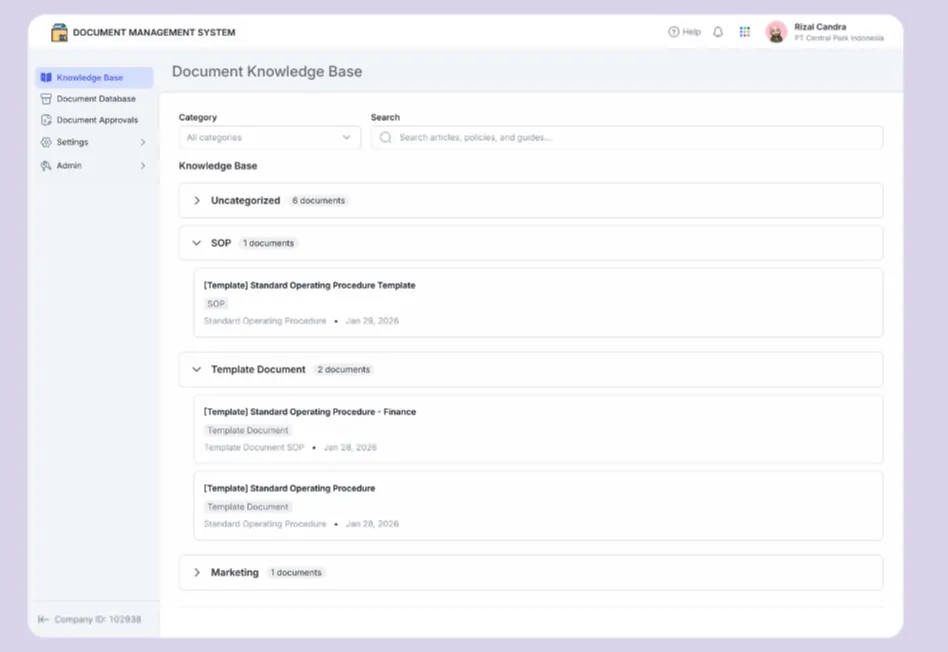
Mekari Officeless is an enterprise application development platform that helps business and IT teams build custom applications, automate workflows, and connect fragmented systems to eliminate operational gaps and accelerate growth.
As part of the platform, Mekari Officeless DMS provides a centralized and secure environment for managing documents across the organization. It helps teams organize information, standardize documentation, automate approval workflows, and control access rights, ensuring documents remain up to date, easy to find, and compliant with company policies.
Key Features
- Centralized Knowledge Base: A digital library that enables employees to quickly access approved policies, guidelines, and documentation through search and category-based navigation.
- Document Database & Templates: A centralized repository for creating, storing, and managing documents while maintaining consistency through standardized templates.
- Automated Document Approvals: Structured workflows for document creation, revision, review, and approval, with clear tracking and accountability.
- Standardization & Document Control: Built-in document types and automatic numbering schemes to improve consistency, traceability, and audit readiness.
- Secure Role-Based Access Control: Granular permissions based on roles, groups, and positions to protect sensitive information.
- Administrative Configuration & Governance: Centralized controls for approval rules, document categories, folder structures, numbering systems, and document governance.
- API-based integration with SAP and other systems — link Mekari DMS document records to SAP Purchase Orders, Equipment records, or contracts via API, with no ABAP development required
Usage Scenarios
- Policy and SOP Documentation: Centralize company policies and procedures to ensure employees always access the latest approved versions.
- Compliance & Audit Support: Maintain approval records and audit trails to support regulatory and compliance requirements.
- Cross-Department Collaboration: Enable structured document reviews and approvals across multiple teams within a single system.
- Reducing Manual Approval Bottlenecks: Replace email-based approvals with automated workflows that provide visibility into review status, approvals, and responsibilities.
Why this matters for SAP-running companies:
Enterprises do not have to choose between their SAP investment and a workable document management system. Mekari Officeless DMS complements SAP by handling what SAP is not optimized to deliver: flexible, accessible, cross-stakeholder document workflows that work for finance teams, procurement officers, field technicians, external vendors, and auditors — all within a single platform.
Deployment takes days, not months. External users can access documents through role-based permissions without a SAP license. And workflows can be configured without SAP consultants.
Ready to close the document management gap in your SAP environment? Explore Mekari Officeless DMS and see how enterprises are deploying centralized document management without rebuilding their SAP core.
References and methodology
Methodology
Methodology
Articles published by Mekari Officeless are developed using trusted sources, including official data, company reports, academic research, and insights from industry practitioners. Whenever possible, we refer directly to primary sources before drawing conclusions. Our editorial team reviews and verifies the information to ensure accuracy and relevance. All references are listed so readers can trace each piece of information back to its original source.
Our editorial standards
Our editorial standards
- Primary source first: We consult official product documentation and pricing pages directly, not secondhand summaries or aggregator sites.
- Fact-checking: All product features, pricing, and claims are cross-verified against each platform’s official website at the time of writing.
- No paid placement: Tools are selected based on relevance and fit for Indonesian businesses, not commercial arrangements. Mekari Officeless is included as a first-party product and is transparently labeled as such.
- Regular review: Articles are periodically updated to reflect product changes or shifts in market relevance.
References
References
SAP Insider. ‘’6 Configuration Steps to Integrate the Document Management System (DMS) and SAP Enterprise Portal’’