


- A document workflow management is the structured process governing how documents are created, reviewed, approved, stored, and archived. This framework serves as the process layer that determines who handles documents, in what sequence, and under what conditions across an organization.
- In B2B deal processes, structured document workflows directly reduce cycle time at every stage from proposal creation through contract execution and post-signature storage.
- Mekari Officeless provides a ready-to-deploy Document Management System with configurable approval workflows, role-based access, and full audit trail capabilities, from day-to-day operational document handling through to deal and contract process management at enterprise scale.
When deals stall at contract review or audit requests surface documents no one can locate, the root cause is rarely the document itself.
According to McKinsey Global Institute, employees spend 8.8 hours every week searching and gathering information, equivalent to 19 percent of their working week.
A structured document workflow management eliminates most of that friction by defining exactly how documents are created, reviewed, approved, stored, and archived across the organization.
Unlike ad-hoc email chains or shared drives with no governance, a workflow enforces routing rules, version control, and access permissions at every stage.
This guide covers the key stages of a document workflow management, common enterprise failure points, and how to build a system that scales.
What Is a Document Workflow Management?
A document workflow management is a structured process that governs how documents are created, reviewed, approved, stored, and eventually archived or disposed of within an organization.
This document management process defines not just where documents live, but who handles them, in what sequence, under what conditions, and with what permissions.
Understanding that distinction also means separating a workflow from a document management system (DMS), two terms that are often used interchangeably but serve different functions:
| Document Management System (DMS) | Document Workflow Management | |
| What it is | The technology layer | The process logic |
| What it does | Stores, organizes, and retrieves documents | Routes, approves, versions, and tracks documents |
| Without the other | A filing cabinet with no rules | Rules with nowhere to enforce them |
Without a defined workflow, document handling defaults to ad-hoc behavior.
Approvals get chased over email, versions are saved with inconsistent naming, and there is no traceable record of who reviewed what or when. At enterprise scale, that becomes both an operational bottleneck and a compliance liability.
A well-designed workflow makes the correct path as the default path. When a contract needs review, the system routes it automatically.
When it is approved, it moves to secure storage with a timestamped audit trail.
When a document reaches its retention limit, it gets flagged for disposal without anyone needing to remember.
Key Stages of a Document Workflow Management
Every document in an organization follows a lifecycle, and a structured workflow maps that lifecycle into defined, repeatable stages.
Most enterprise document workflows move through the following sequence:
1. Document Creation
First of all, teams generate documents from standardized templates rather than starting from scratch.
Using consistent formats from the beginning reduces errors downstream and ensures that metadata, naming conventions, and required fields are captured at the point of creation.
2. Review and Collaboration
The document is routed to relevant stakeholders for input before approval.
Version control runs in parallel here, ensuring all reviewers work from the same draft and that every change is attributed to a specific user with a timestamp.
3. Approval
Routing at this stage is conditional. A standard vendor agreement might route to a department manager, while a high-value contract routes to legal and the CFO before it can proceed.
Automated reminders replace manual follow-up, so approvals do not stall in someone’s inbox.
4. Storage and Indexing
Once approved, documents move to a structured repository with metadata tags that make retrieval fast and accurate.
Role-based access control determines who can view, edit, or download each document type, protecting sensitive records without creating bottlenecks for legitimate access.
5. Retention, Archiving, and Disposal
Retention policies define how long each document type must be kept based on regulatory or business requirements.
When a document reaches the end of its retention period, the system flags it for archiving or disposal, and every action taken is logged in a full audit trail.
Why Enterprises Struggle with Document Workflow Management
Most document workflow problems are not technology problems. They are process problems that technology alone cannot fix.
These are the most common failure points enterprises run into:
- Fragmented storage: Documents live across email threads, personal drives, shared folders, and ERP systems with no unified view. Teams cannot see what exists, where it is, or who last touched it.
- Manual handoffs: Approval requests sent over email have no built-in tracking, no escalation logic, and no visibility into whether anyone has acted on them. One busy approver can stall an entire process.
- Version chaos: When multiple people work on the same document without version control, teams end up reviewing outdated drafts, reconciling conflicting edits, or worse, executing the wrong version.
- No audit trail: Without a system that logs every document action, organizations cannot demonstrate who approved what or when. That gap becomes a serious liability during audits or disputes.
- Slow deal cycles: In B2B contexts, document delays at the proposal, NDA, or contract stage directly extend sales cycles. Every day a document sits waiting for review is a day a deal does not close.
- Compliance exposure: Retention policies that exist only on paper, sensitive documents accessible to the wrong roles, and missing e-signature records all create regulatory risk that compounds quietly over time.
These failures share a common root. When no one has formally designed the workflow, every team improvises its own process, and the gaps between those improvisations are where documents get lost, delayed, or mishandled.
Types of Document Workflow Management
Not all document workflows operate the same way. The right structure depends on the document type, the number of stakeholders involved, and how much flexibility the process requires.
Most enterprise document workflow management fall into one of four categories:
- Sequential workflow: Documents move from one approver to the next in a fixed order. Each stage must be completed before the next begins. This works well for processes with strict sign-off requirements, such as compliance certifications or HR policy updates.
- Parallel workflow: Multiple reviewers receive the document simultaneously and review it independently. Once all parties have responded, the document proceeds. This reduces cycle time for cross-functional reviews where no single reviewer depends on another.
- Conditional workflow: Routing rules change based on document attributes. A contract valued above a certain threshold routes to the CFO. A standard NDA routes only to legal. This is the most scalable structure for enterprises managing high document volumes across departments.
- Ad-hoc workflow: Routing is configured at the time of document creation rather than following a preset path. Useful for non-standard documents or one-off approvals that do not fit existing templates.
However, several enterprise environments use a combination of all four.
A procurement team might run sequential workflows for purchase orders, parallel workflows for vendor evaluations, and conditional workflows for contracts based on value or risk tier.
How to Build an Efficient Document Management Workflow
Building a document management workflow is less about picking the right tool and more about designing the right process first. These steps apply regardless of the platform an organization uses:
1. Map Your Existing Document Processes
Identify which document types your organization handles most frequently and trace how each one actually moves today.
Capture who creates it, who reviews it, where it gets stored, and where the process typically breaks down.
This baseline exposes the bottlenecks and manual steps that a new workflow needs to address.
2. Define Roles and Access Levels
Assign clear ownership for each document type and each stage of the workflow.
Determine which roles can create, edit, review, approve, and archive each category of document.
Access should follow the principle of least privilege: people get access to what they need to do their job, and no more.
3. Standardize Templates and Naming Conventions
Consistent templates reduce errors at the creation stage and ensure required fields are never skipped.
Standardized naming and metadata tagging make retrieval faster across teams and systems, particularly when documents need to be located quickly during audits or deal reviews.
4. Automate Approval Routing
Set conditional routing rules based on document type, value, department, or risk level.
Automated reminders keep approvals moving without manual follow-up.
This is where most of the cycle time reduction comes from, since manual approval chains are typically the single largest source of delay.
5. Enforce Version Control and Audit Trails
Every edit should be timestamped and attributed to a specific user. Previous versions should be accessible but clearly marked as superseded.
A complete audit trail ensures that organizations can reconstruct the full history of any document at any point, which matters in both compliance reviews and contract disputes.
6. Monitor and Optimize Continuously
Use workflow analytics to track cycle times, identify approval bottlenecks, and flag documents that regularly stall at the same stage.
Refine routing rules and access controls as business needs change. A workflow that is not monitored will drift back toward the ad-hoc behavior it was designed to replace.
Document Workflow Management for Deals and Contract Processes
In B2B sales, document handling is not a back-office function. It is a direct variable in deal velocity.
Every delay at the proposal, NDA, or contract stage adds time between a verbal agreement and a signed commitment, and that time carries real commercial cost.
The document workflow for a typical deal moves through several stages, each with its own routing logic and failure points:
1. Proposal Creation
Sales teams generate proposals from approved templates rather than building documents from scratch.
Template-based creation enforces pricing accuracy, legal disclaimers, and brand consistency from the first version. Version control starts here, so every draft is tracked from day one.
2. Internal Review
Before a proposal or contract reaches the client, it routes in parallel to legal, finance, and the account owner for simultaneous review.
Parallel routing keeps cycle time short. Without it, sequential sign-offs can add days to a process that clients experience as unresponsiveness.
3. Client-Facing Distribution
Documents sent to external parties should follow controlled distribution. Access logging records when the document was opened, by whom, and how many times.
That visibility gives sales teams accurate signals on client engagement rather than relying on follow-up calls to gauge interest.
4. Contract Execution
Approved contracts route to e-signature with automated status updates sent to all parties.
Integration between the document workflow and e-signature removes the manual step of downloading, attaching, and re-uploading signed files, which is where version errors most commonly occur.
5. Post-Signature Storage and Obligation Tracking
Executed contracts are indexed with renewal dates, counterparty details, and key terms, making them searchable and auditable.
This indexing matters practically: when a renewal deadline approaches or a dispute arises over contract terms, teams need to locate the right version of the right document within minutes, not hours.
Teams that manage high contract volumes will often extend this into a broader contract lifecycle management practice, covering obligation tracking, renewal triggers, and compliance clauses well beyond the point of signature.
Streamline Your Document Workflow Management with Mekari Officeless
Designing a document workflow is straightforward on paper.
The harder part is enforcing it consistently across departments, document types, and approval chains without building everything from scratch or burdening IT with custom development work.
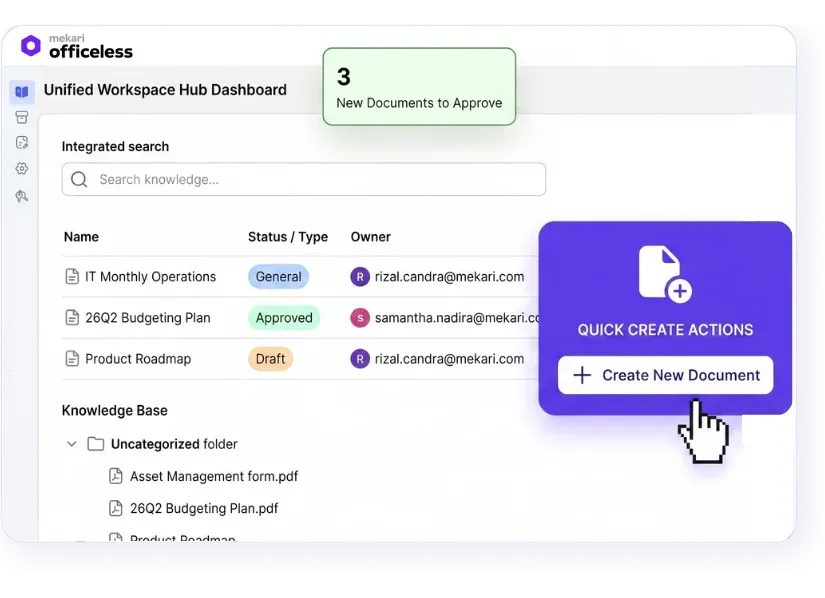
Mekari Officeless addresses this through a ready-to-deploy Document Management System available directly from its marketplace.
Built for mid-to-large enterprises, Mekari Officeless fills the operational gaps that core ERP, HRIS, and CRM systems typically leave unaddressed, including document workflows that span multiple departments and approval layers.
As an enterprise document management software, Mekari Officeless serves several key capabilities, such as:
- Centralized document repository: All documents are stored in one structured, searchable system, eliminating the fragmented storage across drives, inboxes, and legacy systems that causes retrieval delays and version conflicts.
- Customizable approval workflows: Multi-level, conditional routing is configurable without code, so IT and operations teams can build approval chains that match actual business rules rather than workarounds.
- Role-based access control: Granular permissions ensure sensitive documents are only accessible to authorized personnel, enforced at the system level rather than relying on individual judgment.
- Audit trail and compliance logs: Every document action is automatically recorded, giving organizations the full history they need for audits, disputes, and regulatory reviews.
- Mekari ecosystem integration: The DMS connects with HRIS, procurement, and other operational systems within the Mekari ecosystem, allowing document workflows to trigger and respond to events across the broader business process stack.
Organizations that have implemented Mekari Officeless for document management report measurable operational improvements.
RIUNG achieved 3x faster data processing, a 50% reduction in audit time, and 100% centralized document tracking across their operations after deploying the platform.
Centralize document storage, automate approval routing, and eliminate compliance gaps with Mekari Officeless Document Management System.