


- Centralized document management is a governance practice that controls how documents are created, accessed, approved, and retired across the organization.
- Effective implementation follows a phased approach: assess your document landscape, define access and workflow policies before selecting a platform, migrate in priority order, and monitor the first 90 days closely.
- Mekari Officeless provides a ready-to-deploy Document Management System with structured storage, multi-level approval workflows, role-based access control, audit trail, and no-code workflow automation, built for enterprise-scale document governance without building from scratch.
Scattered documents are not a storage problem. It’s a governance problem, and the productivity cost falls directly on the people doing the work.
McKinsey Global Institute found that knowledge workers spend nearly 20 percent of their working week searching for internal information alone.
In organizations where documents are spread across email threads, department drives, and disconnected SaaS tools, that lost time multiplies fast.
Centralized document management solves this by consolidating all organizational documents into a single governed system with structured storage, access controls, and auditable workflows.
This article walks through what centralized document management is, why decentralized approaches fail at scale, and what a well-implemented system looks like in practice.
What Is Centralized Document Management?
Centralized document management is the practice of consolidating all organizational documents into a single, structured repository governed by consistent policies across the entire organization.
In practice, this governance approach is implemented through a centralized document management system (DMS), the technology layer that enforces those policies at every stage of the document lifecycle.
A centralized DMS covers that full lifecycle: how files are created, stored, organized, retrieved, approved, and eventually archived or deleted.
A common misconception is that cloud storage solves this. It does not. Here is the difference:
| Aspects | Cloud Storage | Centralized DMS |
|---|---|---|
| Storage | Yes | Yes |
| Version control | Limited | Full version history with rollback |
| Access governance | Folder-level only | Role-based, document-level |
| Approval workflows | No | Configurable multi-step workflows |
| Audit trail | No | Complete action log with timestamps |
| Retention policies | Manual | Automated by document type |
In short, cloud storage holds files, while centralized DMS governs them.
The Real Cost of Decentralized Document Storage
When documents are scattered across email threads, personal drives, and disconnected tools, the damage shows up across five areas.
- Wasted search time: Knowledge workers spend nearly 20 percent of their working week searching for internal information, according to McKinsey Global Institute, time that multiplies as headcount and document volume grow.
- Uncontrolled access: Without role-based permissions, anyone with folder access can view, edit, or delete documents they should not touch, creating both security and data integrity risks.
- Slow and unreliable handoffs: Approval processes that run through email chains have no enforced routing, no escalation, and no visibility into where a document is stuck.
- No traceability: When documents are changed without a centralized log, organizations cannot prove who approved what, when a version was finalized, or whether the current file reflects the latest decision.
- Untracked physical records: Paper documents stored outside a governed system create a parallel record-keeping problem that document centralization alone cannot solve without a system that bridges both physical and digital records.
None of these problems are solved by adding more storage. They are solved by changing how documents are governed.
Core Components of a Centralized Document Management System
A centralized document management system is more than a repository. It is a governed environment made up of interdependent components that control how documents are created, accessed, changed, and retired.
1. Centralized Document Database
Every organization produces more documents than it can govern without structure.
A centralized document database stores all files in a single repository with consistent metadata, customizable hierarchies, and enforced relationships between files.
Therefore, every document has a governed home regardless of which department created it.
2. Physical Document Mapping
Digital governance alone does not solve the problem for organizations that still handle paper.
Physical document mapping links physical records to their digital counterparts within the same system.
With this component, paper-based assets are tracked and governed alongside digital files rather than managed in a separate, unconnected process.
3. Role-Based Access Control
Not everyone should be able to view, edit, or delete every document.
Role-based access control enforces permissions at the folder or document level based on defined roles.
This feature helps companies remove reliance on informal arrangements or shared credentials that create security and integrity risks.
4. Multi-Level Approval Workflows
Approval processes that run through email have no enforced routing, no escalation, and no visibility.
Configurable multi-level workflows route documents to the right reviewers in the right order, with delegation and escalation rules that keep the process moving when approvers are unavailable.
5. Audit Trail and Version Logging
When a document changes without a centralized log, there is no way to prove who approved what or when a version was finalized.
Audit trail and version logging automatically records every document action — who made it, when, and what changed.
With audit trail and version logging, teams always work from the current version and every decision is traceable.
6. Search and Retrieval
A repository is only useful if people can find what they need.
Full-text search and metadata filtering built on a structured document hierarchy allows any authorized user to locate any document in seconds, without knowing exactly where it was filed or who owns it.
7. No-Code Workflow Automation
Business requirements change, and document processes need to change with them.
No-code workflow automation allows teams to configure and adjust document workflows without IT involvement.
Therefore, updates happen when needed rather than when engineering capacity allows.
Benefits of Centralized Document Management for Enterprises
When these components work together, the operational impact goes beyond tidier file storage. Centralized enterprise document management delivers measurable improvements across productivity, governance, and organizational scalability.
- Faster document retrieval: With structured metadata and full-text search across a single repository, any authorized user can locate any document in seconds. Teams spend time acting on information rather than hunting for it.
- Stronger compliance posture: A complete audit trail, role-based access control, and version logging make it far easier to demonstrate compliance during audits or regulatory reviews. Every document action is recorded automatically, without relying on manual tracking.
- Eliminated version errors: A single controlled version of every document means teams cannot act on outdated files by accident. The current version is always the accessible version, and previous versions remain retrievable with a full change history.
- Faster cross-department collaboration: Approval workflows with enforced routing and escalation rules replace email chains. Handoffs move through a defined process rather than relying on individual follow-up, which reduces delays and removes accountability gaps.
- Operational scalability: A governed document system scales with the organization. New teams, departments, or locations can be onboarded into existing workflows and access structures without rebuilding document processes from scratch.
- Reduced IT and administrative overhead: No-code workflow configuration allows business teams to update document processes independently. IT resources are freed from routine workflow maintenance and redirected to higher-priority initiatives.
The productivity case for document centralization is well supported by McKinsey Global Institute research:
- Making organizational information searchable and structured could allow employees to repurpose 30 to 35 percent of the time they currently spend searching for information (McKinsey, “The Social Economy”).
- Improved collaboration and communication through connected, accessible information systems could raise knowledge worker productivity by 20 to 25 percent (McKinsey, “Capturing Business Value with Social Technologies”).
How to Implement Centralized Document Management
Implementation is a process, not a switch. Organizations that approach document centralization as a phased initiative see faster adoption and fewer disruptions than those that try to migrate everything at once.
1. Assess Your Current Document Landscape
Map where documents currently live across shared drives, email, local machines, and disconnected SaaS tools.
Identify which departments generate the most document volume and where handoffs between teams most frequently break down.
This baseline tells you where centralization will deliver the highest immediate impact and where migration complexity is greatest.
2. Define Access, Retention, and Workflow Policies
Before selecting a platform, define the governance rules that the system will enforce. Three areas to cover:
- Access: Who can view, edit, approve, and delete each document category, and at what level those permissions are enforced.
- Retention: How long each document type is kept, when it moves to archive, and what triggers deletion or legal hold.
- Workflows: How documents move between reviewers, who escalates when approvals stall, and which steps require a formal sign-off versus a simple acknowledgment.
Organizations that skip this step often recreate their existing inefficiencies inside a new system.
3. Choose the Right Platform
Look beyond storage capacity. An enterprise-grade centralized DMS should meet all of the following criteria before you commit:
- Covers all core components: document database, access control, approval workflows, audit trail, version logging, and search
- Configurable to your document hierarchy and approval structures without requiring custom development
- Integrates with adjacent systems such as HR, procurement, finance, and e-signature tools
- Offers no-code or low-code workflow configuration so business teams can update processes without IT involvement
- Provides pre-built deployment options to reduce time-to-value compared to building from scratch
4. Migrate in Phases
Start with the highest-priority document categories rather than the entire archive.
A phased approach limits disruption, allows the team to validate that workflows are configured correctly before expanding, and gives users time to build familiarity with the system before volume increases.
5. Train on the Why, Not Just the How
User adoption is the leading cause of centralization failure.
Training that explains why centralized governance matters produces higher adoption rates and fewer workarounds than training that only covers interface navigation.
Secure executive sponsorship early, as visible leadership behavior directly shapes how seriously teams take the new process.
6. Monitor and Refine
Set a monitoring cadence for the first 90 days after launch. Three metrics to track from day one:
- Access logs: Whether permissions are working as intended and whether any unauthorized access attempts have occurred.
- Search patterns: Which queries return no results, signaling gaps in metadata tagging or document hierarchy.
- Workflow completion rates: Where approvals are stalling, which escalation rules are triggering, and whether any steps are being bypassed.
Use this data to refine configurations before problems compound, and build a continuous improvement roadmap based on real usage rather than assumptions.
Common Use Cases of Centralized Document Management
Centralized document management applies across every function that handles high volumes of documents with strict access or approval requirements.
- HR and employee records: Store, govern, and retrieve personnel files, onboarding documents, and employment contracts through a single employee document management system with role-based access and full audit trail.
- Contract and legal documentation: Route contracts through multi-level approval workflows and maintain a complete version history so every signed document is traceable and retrievable on demand.
- Procurement and vendor documents: Centralize purchase orders, vendor contracts, and delivery records with enforced approval chains that prevent unauthorized commitments.
- Sales documentation: Manage proposals, agreements, and deal-related documents through governed workflows that keep sales cycles moving without version confusion.
- Compliance and regulatory records: Maintain audit-ready documentation with automated access controls and a complete action log across every regulatory record the organization holds.
Centralize Your Document Operations with Mekari Officeless
Choosing the right platform is where most enterprise implementations stall. Generic DMS tools often lack the governance depth enterprises need, while custom builds take months and cost more than the problem they solve.
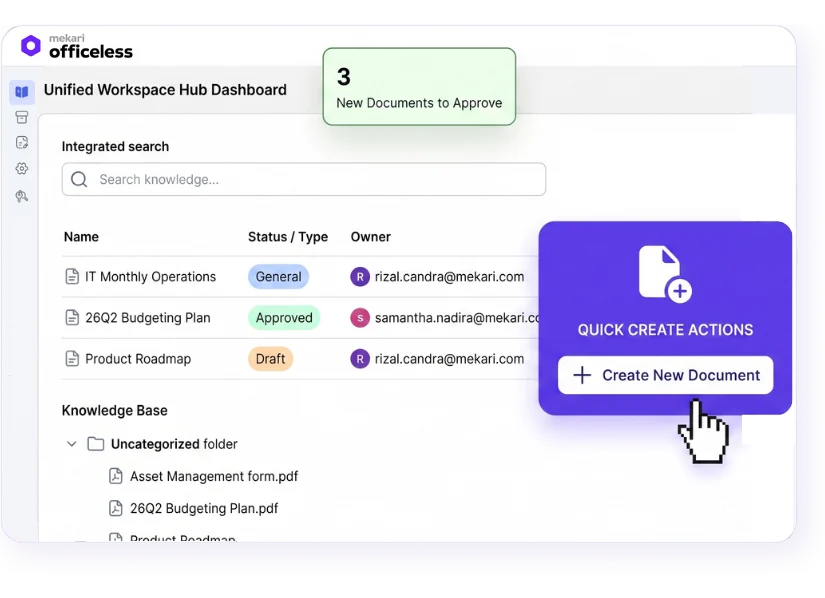
Mekari Officeless provides a ready-to-deploy Document Management System built for enterprise-scale document control.
Teams get a centralized document database, multi-level approval workflows, role-based access control, full audit trail, version logging, physical document mapping, and no-code workflow automation, without building from scratch.
Organizations that have deployed the Mekari Officeless DMS report outcomes that go beyond document retrieval:
- RIUNG: 3x faster data processing, 50% reduction in audit time, 100% centralized document tracking across operations.
- JNE: Reduced delivery disputes by 40% after centralizing dispatch and tracking documentation across warehouses and field couriers.
As part of the Mekari unified software ecosystem, the DMS from Mekari Officeless connects natively with HR, payroll, procurement, and finance functions, so document workflows do not operate in isolation from the rest of the business.
Centralize your document operations and eliminate governance gaps with Mekari Officeless.
References and methodology
Methodology
Methodology
Articles published by Mekari Officeless are developed using trusted sources, including official data, company reports, academic research, and insights from industry practitioners. Whenever possible, we refer directly to primary sources before drawing conclusions. Our editorial team reviews and verifies the information to ensure accuracy and relevance. All references are listed so readers can trace each piece of information back to its original source.
Our editorial standards
Our editorial standards
- Primary source first: We consult official product documentation and pricing pages directly, not secondhand summaries or aggregator sites.
- Fact-checking: All product features, pricing, and claims are cross-verified against each platform’s official website at the time of writing.
- No paid placement: Tools are selected based on relevance and fit for Indonesian businesses, not commercial arrangements. Mekari Officeless is included as a first-party product and is transparently labeled as such.
- Regular review: Articles are periodically updated to reflect product changes or shifts in market relevance.
References
References
Docsvault. “Centralized Document Management System”
McKinsey. “Capturing business value with social technologies”