


- A Document Management System (DMS) eliminates the chaos of scattered files by centralizing storage, enabling faster search, tighter access control, and smoother collaboration across teams.
- Every business has different needs, whether that’s real-time collaboration, workflow automation, or strict regulatory compliance, and the right DMS should match those needs, not force you to adapt to it.
- If off-the-shelf tools aren’t cutting it, Mekari Officeless offers Document Management System, helping businesses streamline document workflows without complex setup. Tailored to your workflows, security requirements, and existing systems.
Every business deals with a constant stream of documents, contracts, invoices, reports, and critical records that keep operations running.
Where these once lived in physical filing cabinets (and too often got lost there), a Document Management System (DMS) brings them into a centralized digital environment.
The result: documents that are easier to find, simpler to manage, and accessible to the right people at any time, so your team spends less time hunting for files and more time doing actual work.
Why document management matters more than ever
Every business runs on documents, contracts, invoices, reports, HR records, legal filings. Managing them well isn’t just about staying organized; it directly affects how fast your team works, how securely you handle sensitive data, and how well you hold up under audits or compliance checks.
- According to IDC, the average knowledge worker spends about 2.5 hours per day — roughly 30% of their workday — searching for information. (IDC via Ripcord)
- Document challenges account for 21.3% productivity loss, costing businesses approximately $19,732 per information worker per year. (IDC via Ripcord)
- According to a 2023 Adobe Acrobat survey, 48% of employees struggle to find documents quickly and efficiently, while 47% feel their company’s online filing system is confusing and ineffective. (Adobe Acrobat / Business.com)
- The global document management system market was valued at $7.16 billion in 2024 and is projected to grow to $24.34 billion by 2032, at a CAGR of 16.6%. (Fortune Business Insights via Business.com)
- 45% of small businesses still rely on traditional paper-based document management, with 11% having no formal document management process in place at all. (SignHouse / Pericent)
A well-implemented DMS doesn’t just solve a storage problem, it changes how your organization moves.
What is a document management system?
A Document Management System (DMS) is a digital platform for storing, organizing, and tracking electronic documents in one centralized location.
It’s worth clarifying a common point of confusion: “Document Management System” and “Document Management Software” are often used interchangeably, but they’re not quite the same thing. The system refers to the broader structure, processes, workflows, and standards. The software is what executes those functions.
A DMS also sits within the larger category of Enterprise Content Management (ECM). Where ECM governs the entire lifecycle of business information, creation, storage, and distribution, a DMS focuses specifically on documents.
Core benefits of adopting a DMS:
- Find and retrieve any document quickly, without digging through folders or inboxes
- Collaborate on documents with version control so you always know what changed and who changed it
- Protect sensitive files with role-based access and a full audit trail
- Cut down on paper, physical storage costs, and manual processing
Here are a few examples of popular document management platforms:
| Software | Key features | Best for |
|---|---|---|
| Mekari Officeless | Low-code/no-code app builder, full customization, Mekari ecosystem integration, role-based access, audit trail | Custom DMS built around your exact workflows |
| Google Workspace | Real-time collaboration, flexible cloud storage, revision history, 2FA | Teams prioritizing cloud-based collaboration across locations |
| OneDrive | 1TB+ storage, Microsoft 365 integration, granular sharing permissions | Organizations already in the Microsoft ecosystem |
| ClickUp | Docs linked to tasks, AI drafting, workflow automation | Remote/hybrid teams needing project + document management platforms in one place |
| DocuWare | OCR indexing, workflow automation, e-signature, ERP integration | Finance, HR, and legal teams with strict compliance needs |
| M-Files | Metadata-based storage, AI search, AutoCAD integration | Engineering and manufacturing companies with high document volumes |
| PandaDoc | Contract templates, eSignature, CRM integration, deal tracking | Sales and marketing teams managing proposals and contracts |
| OnlyOffice | Collaborative editing, full Microsoft Office compatibility, PDF editing | Businesses working across multiple document formats |
| Revver | No-code workflow automation, advanced OCR, permanent audit trail | Healthcare and legal sectors requiring compliance archiving |
| Dropbox Business | Cross-device access, eSignature, file recovery, 24/7 support | Teams needing simple, reliable file sharing and backup |
1. Mekari Officeless
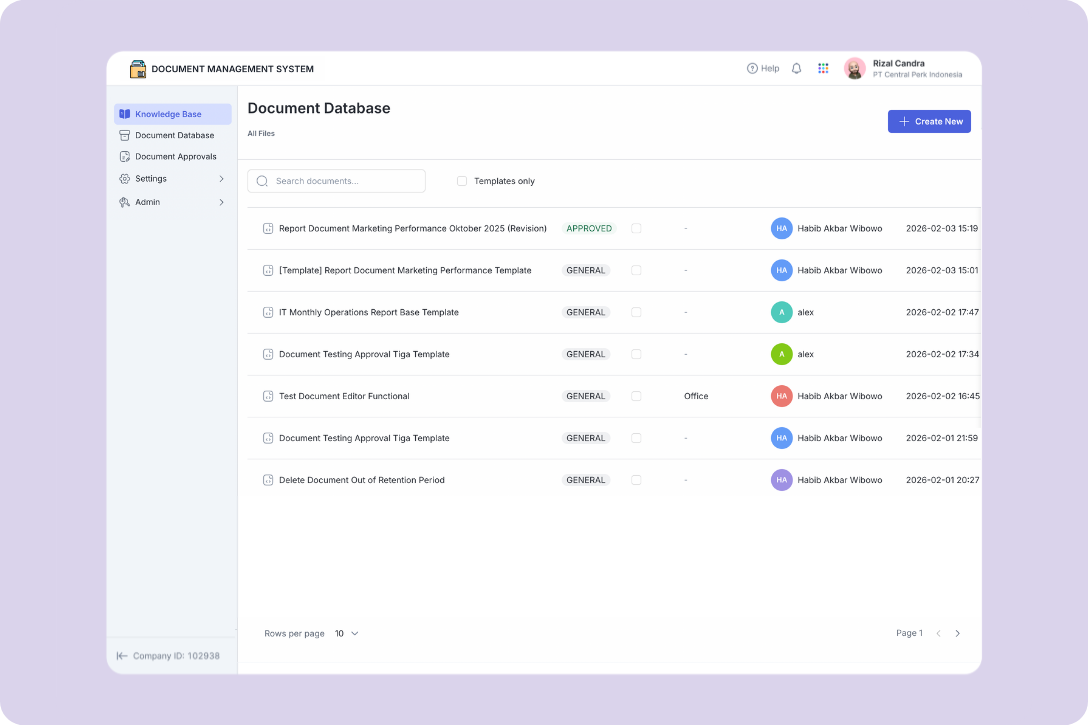
Mekari Officeless offers a Document Management System, a unified solution that empowers organizations to store, organize, and govern documents in one secure environment. It helps teams streamline information management, maintain document consistency, automate approval workflows, and enforce access controls — ensuring documents remain current, easily accessible, and aligned with company policies.
This makes it particularly well-suited for enterprise teams whose document processes don’t fit neatly into off-the-shelf tools.
Core Capabilities
- Centralized Knowledge Base: A single digital library where employees can quickly locate approved policies, guidelines, and company documentation through intuitive search and category-based navigation.
- Document Database & Templates: A unified repository for creating, storing, and managing all company documents. Users can build new documents from scratch or leverage standardized templates to maintain consistency across operational records.
- Automated Document Approvals: A structured workflow that governs the creation, revision, and periodic review of documents — ensuring every file is properly validated, approved, and tracked before official use.
- Standardization & Document Control: Predefined document types and automatic numbering schemes enforce uniform formatting, enhance traceability, and support audit and compliance requirements.
- Secure Role-Based Access Control: Granular permissions based on roles, groups, and positions restrict sensitive documents to authorized personnel only, minimizing the risk of unauthorized access or information leakage.
- Administrative Configuration & Governance: A centralized admin panel for managing approval rules, document categories, folder structures, numbering schemes, and physical document locations to support structured information governance.
Common Use Cases
- Policy and SOP Documentation: Keep company policies and SOPs in one place so employees always access the most current, approved versions.
- Compliance & Audit Support: Maintain clear approval trails and document histories to meet regulatory and audit requirements with confidence.
- Cross-Department Collaboration: Facilitate structured document reviews and approvals across multiple teams within a single, unified platform.
- Eliminating Approval Bottlenecks: Replace scattered, email-based approval chains with organized workflows that clearly assign and track review responsibilities.
2. Google Workspace
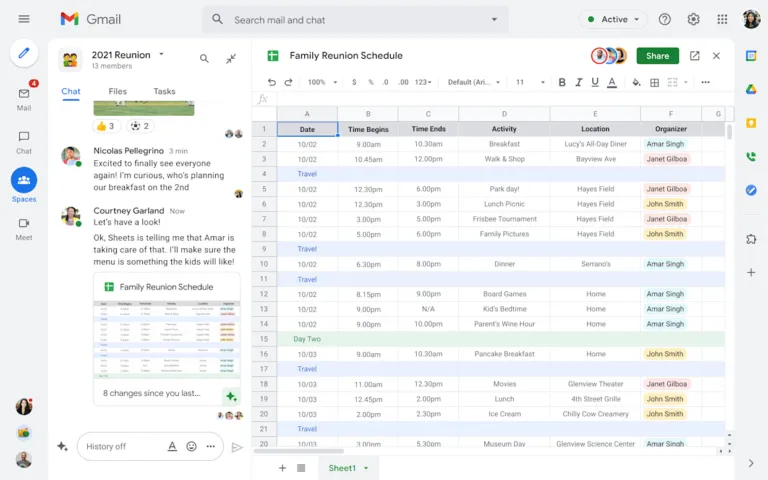
Google Workspace is a cloud productivity suite built around Drive, Docs, Sheets, and Slides. It’s a natural fit for teams that already live in the Google ecosystem and want frictionless collaboration.
Key features: Flexible cloud storage, real-time co-editing, full revision history, granular sharing permissions, cross-app integration, encryption, and two-factor authentication.
Best for: Businesses of any size prioritizing real-time collaboration and flexible multi-device access.
3. OneDrive
OneDrive is Microsoft’s cloud storage service, deeply integrated with Microsoft 365. If your team already uses Word, Excel, Teams, or Outlook, it’s a natural extension.
Key features: 1TB+ storage per user, automatic sync with offline access, real-time co-editing in Office apps, file versioning and recovery, multi-factor authentication.
Best for: Organizations embedded in the Microsoft ecosystem that need tight security controls and seamless integration across tools.
4. ClickUp
ClickUp combines project management and document management in a single platform, making it a practical choice for teams tired of juggling separate tools.
Key features: Documents linked directly to tasks, customizable and reusable templates, real-time collaboration, workflow automation, integrations with Google Drive, OneDrive, and Slack, AI-powered drafting and summarization.
Best for: Remote and hybrid teams that want task management and documentation under one roof.
5. DocuWare
DocuWare is a compliance-focused DMS built for organizations that need to automate document-heavy processes and meet strict regulatory standards.
Key features: Unified storage for digital and paper documents, full-text OCR indexing, automated workflows, legally binding e-signatures, version control, ERP integration (including SAP), GDPR and HIPAA-compatible security.
Best for: Finance, HR, and legal teams where document compliance and process automation are non-negotiable.
6. M-Files
M-Files takes a different architectural approach, instead of organizing documents by folder, it uses metadata. This means you can find any document by what it is, regardless of where it’s stored.
Key features: Metadata-based document structure, Microsoft Office and AutoCAD integration, AI-powered search, offline access with sync, role-based permissions.
Best for: Manufacturing and construction companies managing large volumes of technical documents.
7. PandaDoc
PandaDoc is built for speed in the sales cycle, from creating proposals to getting contracts signed.
Key features: Ready-to-use and customizable document templates, real-time collaboration, document status tracking (viewed, revised, signed), legally binding e-signatures, CRM and payment gateway integration, mobile access.
Best for: Sales and marketing teams that need to create, send, and close documents quickly.
8. OnlyOffice
OnlyOffice is an online office suite with a strong focus on cross-format compatibility and collaborative editing.
Key features: Cloud storage with access controls, collaborative editors for documents, spreadsheets, and presentations, full Microsoft Office format compatibility, version history, PDF and form editing, third-party integrations.
Best for: Teams working across multiple document formats who need centralized, secure collaboration.
9. Revver
Revver is a cloud-based DMS built around automated archiving and audit readiness, particularly suited to heavily regulated industries.
Key features: No-code workflow automation, advanced OCR (including handwriting recognition), permanent and immutable audit trail, Microsoft Office and business app integration, enterprise-grade encryption.
Best for: Healthcare and legal organizations where automated compliance and audit documentation are critical.
10. Dropbox Business
Dropbox Business is a straightforward, reliable platform for file storage, sharing, and collaborative work.
Key features: Desktop, web, and mobile access, real-time collaboration with comments and version tracking, eSignature, file recovery and conversion, user management with role-based permissions, 24/7 live support.
Best for: Teams that need a practical, low-friction solution for shared projects, document revisions, and secure data backup.
When you need a custom DMS
Standard DMS platforms work well for many teams, but enterprise organizations often face complexity that off-the-shelf tools weren’t designed to handle.
Unusual approval chains, tight integrations with internal systems, industry-specific compliance requirements, or workflows that don’t map cleanly onto generic templates all become friction points.
That’s where Mekari Officeless is a genuinely different option. Mekari Officeless offers Document Management System solution accelerator, helping businesses streamline document workflows without complex setup.
You define the document flow, the access hierarchy, the integrations, and the compliance controls. And because it’s built on a scalable platform, it grows alongside your organization rather than becoming a constraint.
References
Business.com. ‘’7 Stats That Will Make You Rethink Your Document Management Strategy’’
Ripcord. ‘’The True Cost of Poor Document Management.’’