


- Document automation refers to technology-driven workflows that handle the full lifecycle of business documents, from generation and approval to storage and retrieval, with minimal manual intervention.
- The most impactful use cases span invoice processing, contract management, HR onboarding, sales proposals, and internal operational documents, each with measurable reduction in manual effort and cycle time.
- Mekari Officeless provides a ready-made Document Management Software that enables enterprises to centralize, automate, and govern document workflows without custom development.
Every business runs on documents. However, most businesses still create, check, and move those documents by hand, one copy-paste at a time, one approval request at a time.
According to McKinsey, knowledge workers spend approximately 20% of their workweek searching for and gathering information, a figure that reflects how much of the document burden still falls on individuals rather than systems.
Document automation changes this. This use of technology utilises templates, conditional logic, and system integrations to handle document creation, extraction, validation, and routing with minimal manual intervention.
Automated workflows run the same process consistently, regardless of volume or team size.
This article walks through how document automation works, its benefits, common use cases, and how to evaluate platforms.
What is document automation
Document automation is the use of technology to create, manage, and distribute business documents with minimal human intervention.
The terms document assembly and document workflow automation are used interchangeably in the industry to refer to the same concept.
In manual workflows, teams rely on individual effort: copying data between systems, reformatting templates by hand, and tracking versions through email threads.
Document automation replaces these steps with templates, predefined rules, and system triggers connected to existing data sources.
Document automation covers two distinct sides of the document lifecycle:
- Creation side: generating outgoing documents such as contracts, proposals, invoices, and HR forms from templates and structured data
- Processing side: extracting fields from incoming documents, validating data against connected systems, and routing it to the right workflow or team
Document automation vs RPA vs BPA
Document automation is often mentioned alongside RPA and BPA, but the three serve different purposes. Understanding the distinction helps when evaluating which approach fits a specific business problem.
| Aspects | RPA | BPA | Document Automation |
|---|---|---|---|
| Focus | UI-based tasks (clicks, data entry, screen scraping) | End-to-end business processes across systems | Documents as the primary unit of work |
| Scope | Individual repetitive tasks | Multi-system process orchestration | Document creation, extraction, validation, routing |
| Trigger | UI interaction or schedule | Process event or decision point | Document input or data event |
| Best for | Replacing manual clicks at scale | Automating complex cross-functional workflows | Generating or processing documents with structured data |
The three can overlap. What distinguishes document automation is its focus on the document itself, not the UI or the broader process around it.
How document automation works
Document automation follows a consistent end-to-end flow, from the moment a document enters or is requested from a system to the point it is stored and accessible.
The steps below apply whether the process involves generating an outgoing document or handling one that arrives.
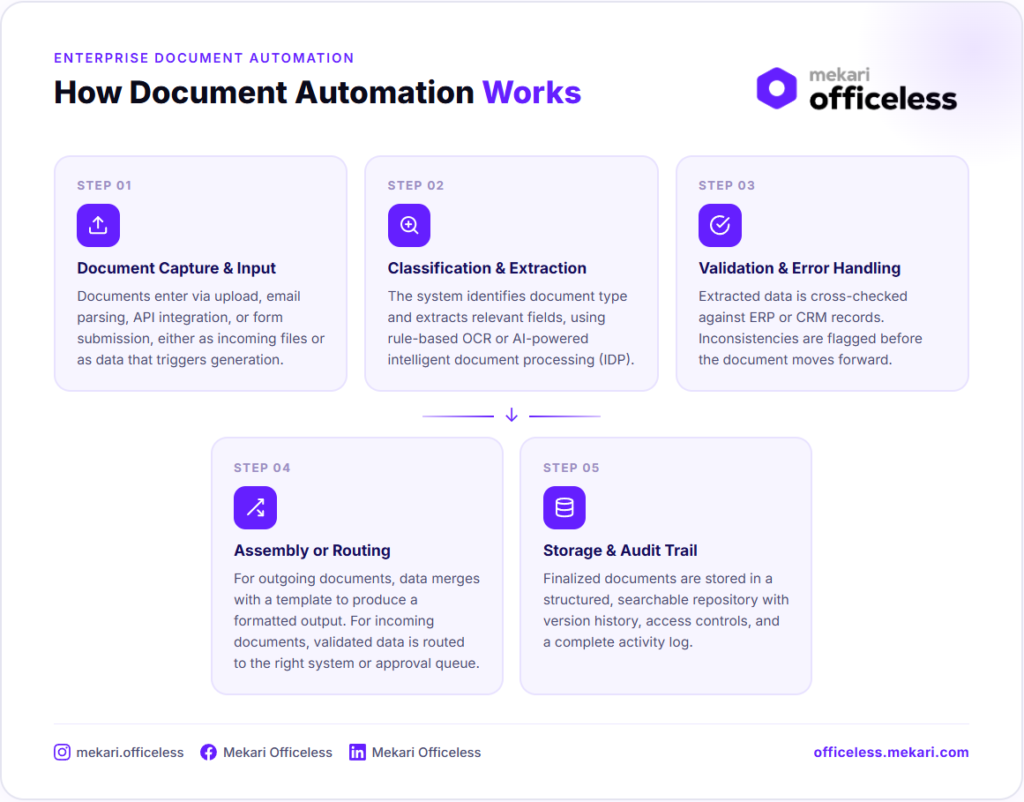
1. Document capture and input
Documents enter the system in two ways: as incoming files that need to be processed, or as data inputs that trigger document generation.
Capture methods include direct upload, email parsing, API integration, and form submission.
This step determines what the system receives and how it is handed off to the next stage.
2. Data classification and extraction
The system identifies the document type, whether an invoice, contract, HR form, or another format, and extracts the relevant fields.
Techniques range from rule-based OCR to AI-powered intelligent document processing (IDP).
OCR reads and converts text from scanned images or PDFs into machine-readable data. IDP goes further, adding document classification, contextual understanding, and validation on top of basic text recognition.
For organizations handling varied or unstructured documents, IDP handles cases that OCR alone cannot.
3. Data validation and error handling
Extracted data is checked against predefined rules or connected systems such as an ERP or CRM.
Inconsistencies are flagged before the document moves forward.
This step is where automation reduces human error most significantly, catching mismatches that manual review would typically miss or catch too late.
4. Document assembly or routing
For outgoing documents, validated data merges with a template to produce a complete, formatted output ready for review, signature, or distribution.
For incoming documents, validated data is routed to the appropriate system or workflow: an approval queue, a database entry, or a notification trigger.
The path depends on rules defined during setup.
5. Storage, access, and audit trail
Finalized documents are stored in a structured, searchable repository with version history and access controls.
Every action taken on a document is logged. This step is critical for compliance and audit readiness, giving teams a reliable record without any additional manual effort.
Key benefits of document automation
Document automation delivers measurable impact across the teams that handle the highest volumes of business documents.
The gains are operational, financial, and structural.
- Efficiency and time savings: teams spend less time on repetitive formatting, data entry, and manual routing, and document turnaround time drops while staff capacity shifts to higher-value work
- Accuracy and error reduction: automation pulls data directly from source systems and applies consistent rules at every step, removing the conditions where copy-paste errors and version mismatches occur
- Compliance and audit readiness: automated systems enforce document standards, retain version history, and produce audit trails without additional effort from the team
- Scalability: the same automated workflow handles 10 documents or 10,000 with no proportional increase in headcount required
- Faster approvals and cycle times: automated routing and notifications reduce bottlenecks in approval chains, especially for contracts, purchase orders, and HR documents
The impact of these benefits becomes clearer when measured against manual baselines.
- McKinsey found that deploying document automation in source-to-pay workflows improved first-time invoice accuracy by 15% and reduced cycle times by 20%.
- Automating RFP and proposal drafting using NLP and RPA can reduce document preparation time by up to two-thirds, according to McKinsey
- APQC benchmarking data shows that organizations processing invoices manually spend a median of $10 to $21 per invoice, while top performers using automation bring that figure down to $2.07.
- McKinsey estimates that process automation at scale can reduce operational costs by up to 30% over five years for organizations that pair it with broader process transformation.
These numbers reflect outcomes across specific use cases and industries.
The actual impact depends on document volume, process complexity, and integration depth, but the directional pattern is consistent across automation and reduces cost, time, and error rates across every document type it is applied to.
Common use cases for document automation
Document automation applies across industries and functions. The five use cases below represent the highest-volume and highest-impact areas where organizations typically start.
1. Invoice and financial document processing
Incoming invoices follow a defined automated flow from capture to posting:
| Stage | What happens |
|---|---|
| Capture | Invoice received via email, upload, or API. |
| Extraction | Vendor name, amount, and line items are pulled from the document. |
| Validation | Extracted data is checked against existing purchase orders in the ERP. |
| Routing | Invoice is sent to the appropriate approver based on predefined rules. |
| Posting | Approved invoice is posted to the accounting system automatically. |
This is one of the highest-volume document types in most organizations and one of the most error-prone when handled manually. Errors in invoice processing compound downstream, affecting payment cycles, vendor relationships, and financial reporting accuracy.
2. Contract creation and management
Legal and sales teams use templates with conditional logic to generate contracts from CRM or deal data. Automation handles three functions that are typically managed manually:
- Document generation: contracts are populated with deal data and formatted automatically, reducing drafting time.
- Version control: every revision is tracked and stored, with a clear history of changes and approvals.
- Renewal tracking: contracts approaching expiration are flagged automatically before they lapse unnoticed.
3. HR and employee onboarding documents
HR teams automate the generation, routing, and storage of documents across the employee lifecycle. Common document types include:
- Offer letters and employment contracts.
- Onboarding forms and checklists.
- Policy acknowledgments and compliance sign-offs.
Each document is generated from a template populated with employee data, routed for the right signatures, and stored in a structured repository.
This reduces administrative load during high-volume hiring periods without requiring additional headcount.
4. Sales proposals and quotes
Sales teams generate proposals by pulling product, pricing, and client data from a CRM directly into a branded template.
The output is a complete, formatted document ready for review and delivery.
Faster proposal turnaround has a direct impact on deal velocity, particularly in competitive sales cycles where response time is a factor in the buying decision.
5. Internal operational documents
Standard operating procedures, approval forms, and project reports can also be automated using no-code or low-code platforms.
These documents are often overlooked in automation initiatives because they are internal, but the manual effort required to create, update, and distribute them at scale is substantial.
For organizations building custom workflows around internal processes, platforms like Mekari Officeless become relevant.
Choosing the right document automation software
Not all document automation platforms are built the same way. The right choice depends on how a business actually operates, not just what a platform is capable of on paper.
- Key capabilities: template engine, data integration (CRM, ERP, API), conditional logic, approval workflow, access control, audit trail, and document storage.
- No-code vs. low-code vs. developer-heavy: no-code lets business users build workflows without engineering support; low-code adds flexibility with some technical input; developer-heavy maximizes customization but increases IT dependency.
- Process fit over feature fit: the right platform should map to how the business actually works, not force the business to adapt to the platform.
- Integration depth: a platform that cannot connect to existing ERP, HRIS, or CRM systems creates data silos that defeat the purpose of automation.
- Scalability and customization: the platform should handle growing volumes and support custom workflows for processes that off-the-shelf software does not cover.
A practical starting point for ROI evaluation is to calculate time saved per document type multiplied by volume.
For high-frequency documents like invoices or onboarding forms, the numbers add up quickly at scale.
Automate your document workflows with Mekari Officeless
Most organizations have document processes too specific for off-the-shelf software to handle well.
Mekari Officeless is an enterprise development platform that lets organizations build and deploy custom document automation software without going through a full software development cycle.
The ready-made Document Management System (DMS) is one of the fastest ways to get started.
Key capabilities of the Mekari Officeless DMS include:
- Centralized knowledge base: a single repository where employees can find approved policies, guidelines, and operational documents through search and category-based navigation.
- Document database and templates: standardized templates and a unified document repository ensure consistency across all operational documentation.
- Automated document approvals: structured approval workflows manage new documents, revisions, and periodic reviews from draft to approved without manual follow-up.
- Document control and standardization: built-in document types and automatic numbering schemes enforce consistent formats and support audit and compliance requirements.
- Secure role-based access control: granular permissions based on roles, groups, and positions ensure sensitive documents are only accessible to authorized personnel.
- Audit trail and governance: every approval, status change, and user action is logged, giving organizations a complete and immutable record for compliance reviews.
Organizations that have deployed Mekari Officeless DMS report measurable outcomes. JNE reduced delivery disputes by 40% after centralizing dispatch and tracking documents on the platform. Another enterprise achieved a 70% increase in operational speed after replacing a legacy manual system with Mekari Officeless workflows.
Centralize tracking, eliminate approval bottlenecks, and strengthen document governance with Mekari Officeless DMS.
References and methodology
Methodology
Methodology
Articles published by Mekari Officeless are developed using trusted sources, including official data, company reports, academic research, and insights from industry practitioners. Whenever possible, we refer directly to primary sources before drawing conclusions. Our editorial team reviews and verifies the information to ensure accuracy and relevance. All references are listed so readers can trace each piece of information back to its original source.
Our editorial standards
Our editorial standards
- Primary source first: We consult official product documentation and pricing pages directly, not secondhand summaries or aggregator sites.
- Fact-checking: All product features, pricing, and claims are cross-verified against each platform’s official website at the time of writing.
- No paid placement: Tools are selected based on relevance and fit for Indonesian businesses, not commercial arrangements. Mekari Officeless is included as a first-party product and is transparently labeled as such.
- Regular review: Articles are periodically updated to reflect product changes or shifts in market relevance.
References
References
McKinsey. “Optimizing front- and back-office services in advanced electronics”