


- Document version control is the systematic process of tracking, managing, and recording every change made to a document throughout its lifecycle, giving teams a single, auditable source of truth for every revision.
- Most document version control failures are process failures, not technology failures: teams often have tools available but lack a shared convention, clear ownership, and adoption discipline to use them consistently.
- Mekari Officeless provides a ready-made document management system built for enterprise teams that need structured version tracking, role-based access control, and automated approval workflows without custom development.
When multiple stakeholders collaborate on a document, the real risk is not duplication. It is a decision made on the wrong version.
McKinsey Global Institute found that knowledge workers spend 19 percent of their working hours just tracking down information needed to complete tasks.
Document version control solves this by creating a structured, traceable record of every revision.
It assigns each document iteration a unique version identifier, along with metadata capturing who changed what and when.
This article breaks down how it works, the challenges teams most commonly face, and the practices that make version control sustainable at scale.
What Is Document Version Control?
Document version control is the systematic process of tracking, managing, and recording every change made to a document throughout its lifecycle. This practice applies to any business-critical file: policies, contracts, SOPs, project plans, and reports.
Document version control comes in two forms:
- Manual versioning relies on file naming conventions and version tables maintained by the team itself.
- Automated versioning uses software to record changes with timestamps, author logs, and revision histories without manual input.
The terms “document versioning” and “revision control” are often used interchangeably with document version control. They refer to the same core practice.
As teams grow and documents pass through more stakeholders, knowing which version is current and who changed what becomes a core operational need, not a nice-to-have.
Why Document Version Control Matters for Teams
Without a structured versioning system, teams risk working from outdated or conflicting document versions.
The result: errors, rework, and miscommunication that compound as the team scales.
There are four core reasons document version control matters:
- Traceability: Every change is logged with author, timestamp, and context, creating an audit trail that is critical for regulated industries and compliance-heavy workflows.
- Collaboration: When multiple contributors edit the same document, version control prevents overwrites and ensures changes are tracked or merged correctly.
- Accountability: Named version histories make it clear who approved or modified a document at each stage, removing ambiguity from multi-stakeholder workflows.
- Productivity: McKinsey Global Institute found that knowledge workers spend 19 percent of their working hours tracking down information. Poor version control is a direct contributor to that drain.
Together, these four factors determine whether a team’s document workflows support or slow down the business.
How Document Version Control Works
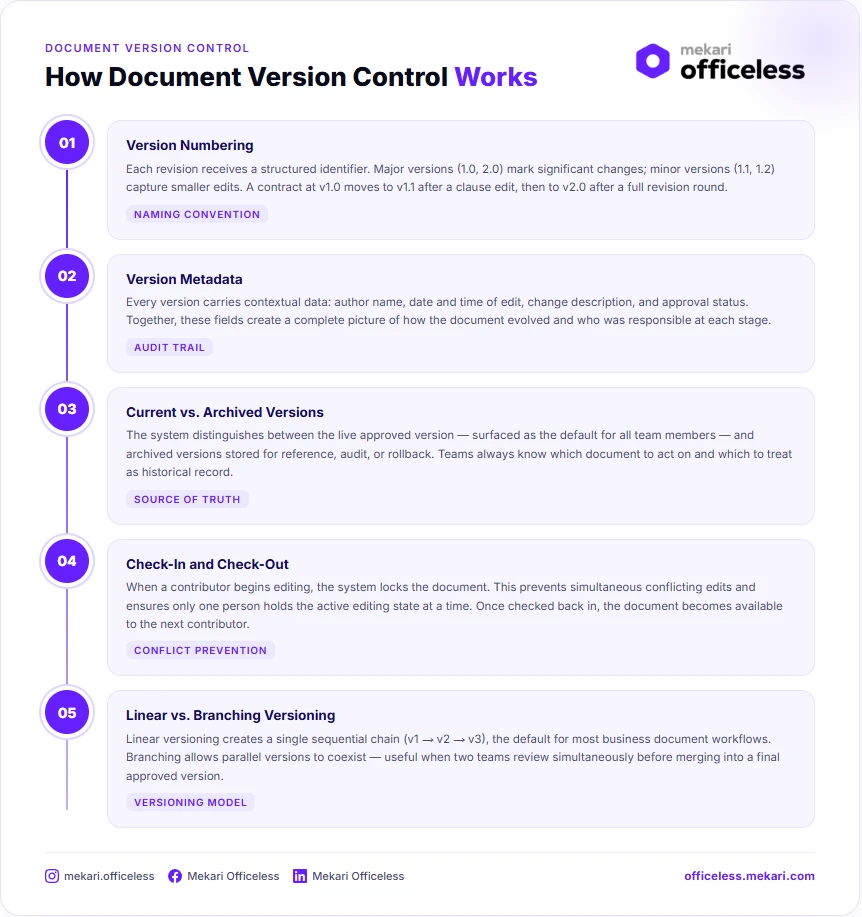
At its core, document version control works by creating a new version each time a document is modified. Previous versions remain accessible in a revision history, so nothing is permanently overwritten or lost.
1. Version Numbering
Version numbering follows a simple convention:
- Major versions (1.0, 2.0) reflect significant changes, such as a full redraft or a structural overhaul.
- Minor versions (1.1, 1.2) reflect smaller edits, such as wording corrections or formatting updates.
For example, a contract starting at v1.0 might move to v1.1 after a minor clause edit, then jump to v2.0 once both parties agree to a significant revision round.
2. Version Metadata
Each version carries metadata that provides context beyond the content itself:
- Author name
- Date and time of edit
- Change description
- Approval status
Together, these fields create a complete picture of how a document evolved and who was responsible at each stage.
3. Current vs. Archived Versions
Document version control distinguishes between two version states:
- Current version: the latest approved document, surfaced as the default for all team members.
- Archived versions: superseded iterations stored for reference, audit, or rollback purposes.
Having this distinction ensures teams always know which document to act on and which to treat as historical record.
4. Check-In and Check-Out
Most document management systems lock a document while it is being edited.
This prevents simultaneous conflicting edits and ensures only one contributor holds the active editing state at a time.
5. Linear vs. Branching Versioning
Versioning models vary depending on how a team collaborates:
- Linear versioning creates a single sequential chain (v1 → v2 → v3), most common in business document workflows.
- Branching versioning allows parallel versions to coexist, useful when two teams review and annotate the same document simultaneously before merging into a final approved version.
For most business teams, linear versioning is the default. Branching is more common in technical documentation or product development contexts.
What Happens When Version Conflicts Occur
Version conflicts are the most disruptive failure mode in collaborative document workflows. They occur when two or more contributors edit the same document simultaneously without a locking or sync mechanism in place.
1. How Systems Handle Conflicts
When a conflict is detected, document management systems typically respond in one of three ways:
- Manual merge: the system prompts the second editor to review both versions and reconcile the differences manually.
- Conflict copy: one version is designated as primary, while the other is saved as a separate conflict copy for review.
- Edit block: the system prevents the second edit entirely until the first editor checks the document back in.
The right response depends on the system in use and the sensitivity of the document being edited.
2. When Conflicts Go Undetected
In manual versioning environments, such as email attachments or shared drives without locking, conflicts often go undetected entirely.
The outcome is two “final” versions circulating simultaneously, with no clear mechanism to determine which one is authoritative.
This is the most damaging scenario, and the most common.
3. Prevention Is Better Than Resolution
Conflict resolution is costly. Therefore, prevention is the more practical goal.
Teams that establish clear document ownership, enforce check-in and check-out discipline, and use real-time co-editing with change tracking significantly reduce the likelihood of conflicts before they occur.
Common Challenges in Document Version Control
Most document version control failures are process failures, not technology failures.
Teams often have the tools available but lack a shared convention for using them consistently. These are the most common challenges organizations encounter.
- Siloed storage: Documents are saved across email threads, local drives, and multiple cloud folders with no single source of truth, making it impossible to confirm which version is current.
- Inconsistent naming conventions: Teams use different file naming formats, such as “final,” “final_v2,” and “final_REVISED,” with no agreed sequencing logic.
- Manual versioning at scale: Spreadsheet-based or file-name-based version tracking breaks down quickly as document volume and team size grow.
- Lack of access controls: Without permission settings, any team member can overwrite or delete a version, creating risk for sensitive documents.
- No archiving policy: Old versions accumulate without a clear process for retiring superseded documents, creating clutter and confusion in shared repositories.
- Adoption resistance: Even when a document management system is in place, teams often default to familiar habits such as sending attachments via email or saving locally. This behavioral gap is one of the most common and least-discussed failure modes.
Addressing these challenges requires more than deploying the right tool. It requires building a shared convention that the entire team understands and follows consistently.
Best Practices for Document Version Control
Building an effective document version control process requires a clear starting point.
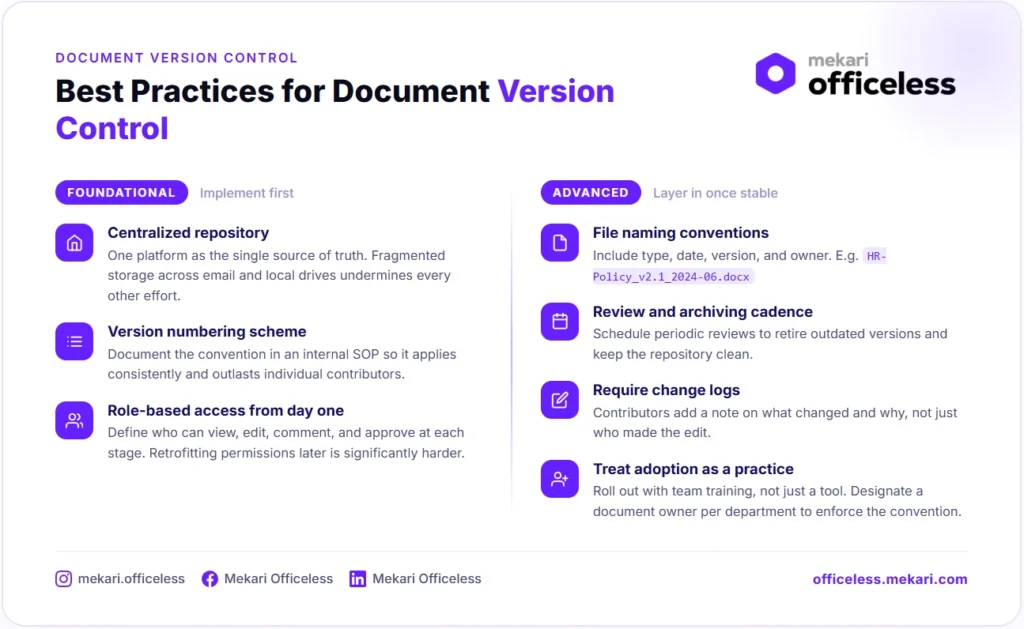
The practices below are organized into two tiers: foundational steps that should be in place first, and advanced practices to layer in once the foundation is stable.
1. Foundational
These are the non-negotiables. No other practice works reliably without these three in place.
- Establish a centralized repository: Use a single platform as the source of truth for all versioned documents. Fragmented storage across email, local drives, and multiple cloud folders undermines every other version control effort.
- Define a version numbering scheme: Document the convention in an internal SOP or style guide so it outlasts individual contributors and applies consistently across teams.
- Set access permissions by role: Distinguish who can view, edit, comment, and approve at each version stage. Retrofitting permissions after the fact is significantly harder than building them in from the start.
Get these three in place before anything else. They form the infrastructure that every other practice depends on.
2. Advanced
Once the foundation is stable, these practices extend the system and make it more resilient over time.
- Define file naming conventions: Include document type, date, version number, and owner where relevant. For example: HR-LeavePolicy_v2.1_2024-06_OwnerHR.docx.
- Build a review and archiving cadence: Schedule periodic reviews to retire outdated versions and keep the document repository clean.
- Require change logs: Ask contributors to add a brief note describing what changed in each new version, not just who changed it, but what and why.
- Treat adoption as a practice, not an afterthought: Roll out document version control conventions with team training, not just a tool deployment. Designate a document owner per department responsible for enforcing the convention. Without adoption, even the best system defaults back to email attachments within weeks.
Applied together, these practices turn document version control from a reactive fix into a proactive operational standard.
Document Version Control Examples and Use Cases
Version control is not limited to code repositories or software development. Any document that passes through multiple reviewers, revision cycles, or approval stages benefits from a structured versioning process. Here are the most common use cases across business functions.
| Document Type | Key Stakeholders | Main Risk Without Version Control |
|---|---|---|
| Policy documents | HR, Legal, Leadership | Outdated policies circulating as official references |
| Contracts and legal documents | Legal, Finance, External parties | Disputed drafts with no clear authoritative version |
| SOPs and work instructions | Operations, Compliance, Floor teams | Staff executing outdated or unsafe procedures |
| Project deliverables | Project managers, Clients, Stakeholders | Conflicting feedback rounds based on different draft versions |
| Product and technical documentation | Product, Engineering, Technical writers | Teams building on specs that no longer reflect the current product |
1. Policy Documents
HR policies, compliance procedures, and company handbooks are living documents. They are updated as regulations change, leadership decisions shift, or internal processes evolve. A single policy document might go through legal review, HR approval, and executive sign-off before it is published, each stage producing a new version.
Without version control, an earlier draft can circulate as if it were official. Employees act on outdated guidance, and there is no reliable way to prove which version was in effect at a given point in time, a serious liability in audit or dispute scenarios.
2. Contracts and Legal Documents
Contract negotiation is iterative by nature. Each round of review between parties produces a revised version with additions, deletions, and tracked changes. Version history here is not just an organizational convenience; it is legal evidence.
Without a clear versioning trail, disputes over which clause was agreed upon, which party made a specific change, and when a term was introduced become difficult to resolve. Version control removes that ambiguity and protects both parties throughout the negotiation lifecycle.
3. SOPs and Work Instructions
Operational teams execute tasks based on documented procedures. When those procedures change, whether due to regulatory updates, process improvements, or equipment changes, the updated SOP must replace the previous one cleanly and completely.
The risk of poor version control here is direct:
- Staff may follow a procedure that has been superseded without knowing it
- Compliance audits may surface outdated instructions still in active use
- In safety-critical environments, executing the wrong procedure version carries real operational risk
4. Project Deliverables
Client-facing documents such as proposals, reports, and presentations go through multiple feedback rounds. Each round produces a revised version, and each stakeholder may be reviewing a different one if version control is not enforced.
Without clear version markers, teams end up incorporating contradictory feedback, resending documents that have already been superseded, and losing track of which comments have been addressed. Version control keeps every review cycle anchored to a single, clearly identified document state.
5. Product and Technical Documentation
Product documentation changes continuously as features are added, deprecated, or modified. A spec document that was accurate at the start of a sprint may be outdated by the time engineering begins implementation.
Version control in this context does two things:
- It aligns documentation with product releases, so teams always build against the current spec
- It preserves a history of how product decisions evolved, which is valuable for onboarding, retrospectives, and compliance
Across all of these use cases, the underlying need is the same: a reliable way to know which version is current, who authorized it, and what changed from the version before.
Manage Document Version Control with Mekari Officeless
As document volume grows and more stakeholders get involved, manual version control becomes a bottleneck.
The problem is not a lack of effort. It is a lack of infrastructure.
Mekari Officeless is an enterprise development platform that lets organizations build custom document management workflows tailored to how their teams actually operate.
For teams that need a faster starting point, Mekari Officeless offers a ready-made Document Management System template has the core infrastructure already in place:
- Centralized document repository: a single source of truth for all organizational documents, replacing fragmented storage across email and local drives.
- Automated version tracking: the system records changes and manages version updates automatically, so teams always work from the latest approved version while previous versions are deprecated without manual intervention.
- Role-based access control: granular permissions by role, group, and position ensure sensitive documents are only accessible to authorized personnel at each stage of the document lifecycle.
- Structured approval workflows: pre-configured approval chains move documents from draft to review to approval, with full visibility into who approved what and when.
- Immutable audit trail: every document action is logged automatically, supporting compliance reviews and audit readiness without additional effort.
Streamline document version control with Mekari Officeless Document Management System.
References and methodology
Methodology
Methodology
Articles published by Mekari Officeless are developed using trusted sources, including official data, company reports, academic research, and insights from industry practitioners. Whenever possible, we refer directly to primary sources before drawing conclusions. Our editorial team reviews and verifies the information to ensure accuracy and relevance. All references are listed so readers can trace each piece of information back to its original source.
Our editorial standards
Our editorial standards
- Primary source first: We consult official product documentation and pricing pages directly, not secondhand summaries or aggregator sites.
- Fact-checking: All product features, pricing, and claims are cross-verified against each platform’s official website at the time of writing.
- No paid placement: Tools are selected based on relevance and fit for Indonesian businesses, not commercial arrangements. Mekari Officeless is included as a first-party product and is transparently labeled as such.
- Regular review: Articles are periodically updated to reflect product changes or shifts in market relevance.
References
References
RGPM. “Document version control made easy (with examples)”