


- Employee document management remains one of HR’s most persistent operational burdens. With 48% of employees struggling to find documents quickly and 83% resorting to recreating documents rather than searching for them, the hidden cost of disorganized HR records goes far beyond filing cabinets.
- A dedicated employee document management system eliminates these inefficiencies by centralizing storage, automating workflows, enforcing retention policies, and providing full audit visibility — all while protecting sensitive employee data in line with regulatory requirements.
- Mekari Officeless provides a ready-to-deploy Document Management System module purpose-built for enterprise needs in Indonesia. From onboarding paperwork to performance records and compliance documentation, manage every employee document in one secure, automated system.
HR teams are buried in paperwork, contracts, payslips, performance reviews, compliance certificates, and the pile never stops growing.
According to a 2023 Adobe Acrobat survey, 48% of employees struggle to find documents quickly, and nearly two-thirds say poor digital organization directly hurts their productivity.
An employee document management system (EDMS) fixes this: a centralized platform that organizes, secures, and automates HR records across the entire employee lifecycle. This guide covers everything you need to know to choose the right one.
What is an employee document management system?
An employee document management system is a digital solution that stores, organizes, and manages all HR-related documents in a secure, centralized repository. This includes:
- Employment contracts
- Payslips
- Performance appraisals
- Disciplinary records
- Compliance certificates
Unlike generic file storage tools like Google Drive or SharePoint, an EDMS is purpose-built for HR. It comes with role-based access control, audit trails, version control, retention schedules, and automated workflows that keep document processes consistent and compliant.
You may also see it referred to as HR document management software or employee records management software. Different name, same core function.
EDMS solutions come in two deployment types.
- On-premises systems are hosted on a company’s own servers, giving IT teams full control but requiring significant infrastructure and maintenance.
- Cloud-based systems, hosted by the vendor, are increasingly the preferred choice for most organizations because they offer greater scalability, remote access for distributed teams, and lower IT overhead with no hardware to manage.
Why businesses need an employee document management system
Most HR teams are drowning in their documents. And the cost of that chaos is higher than most organizations realize.
The scale of the problem
U.S. businesses waste $8 billion annually just managing paper, with costs running approximately $20 to file a document, $120 to find a misplaced one, and $220 to reproduce a lost one (Corp! Magazine).
The search problem is just as severe: nearly 20% of business time, the equivalent of one full day per week, is wasted by employees searching for information to do their job effectively (Interact).
And when people can’t find what they need? Around 83% of employees will simply recreate a document rather than spend time searching for it in the company network (Armstrong Archives).
Compliance and legal risk
HR departments are legally obligated to protect sensitive employee data, from medical records to personal identification, and failure to do so can result in significant fines and legal liability.
The documentation gap makes this harder: studies and industry reports suggest that 60% of compliance failures can be traced back to inadequate or inaccurate documentation (Quality Systems Now).
Productivity loss
Knowledge workers spend up to 50% of their time creating and preparing documents (Armstrong Archives), and inefficient document management compounds that waste further.
The fix is measurable: automated processes can increase productivity by 50% or more (Tufts University / Business Paper Reduction Guide).
Security and data breach risk
The financial stakes are significant. According to IBM Security’s 2020 Cost of a Data Breach Report, data breaches cost companies an average of $3.86 million per incident (IBM Security).
An EDMS directly addresses this by applying role-based access controls and encryption across all HR records, critical safeguards when sensitive employee data is involved.
5 best employee document management systems
Choosing the right employee document management system is not just about storage, but also about making HR files easier to access, control, and manage securely as your organization grows.
1. Mekari Officeless Document Management System Prebuilt App
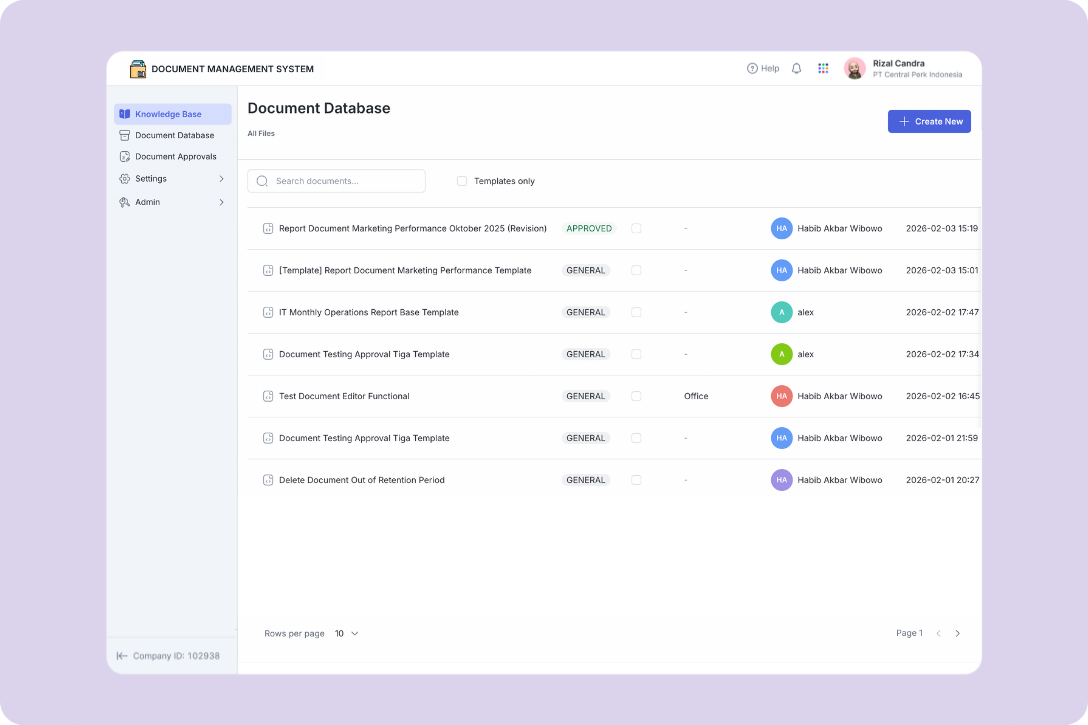
Mekari Officeless is an enterprise solution that extends core ERP and business systems to close operational gaps through solution accelerators, custom workflows and dashboards, and custom development services.
For employee document management, Mekari Officeless provides a ready-to-deploy Document Management System that helps organizations centralize employee documents, automate approval workflows, control access, and maintain audit trails without building a document management solution from scratch.
The solution can integrate with the broader Mekari ecosystem, including Mekari Talenta and Mekari Payroll, making it particularly relevant for organizations that already use Mekari solutions and need stronger document governance across their HR operations.
As a solution accelerator, the Document Management System can be adapted to an organization’s operational requirements while providing the rapid deployment, security, and cost efficiency expected from an enterprise solution.Key features:
- Knowledge base self-service portal: A centralized digital library where employees can independently browse verified company policies, HR guidelines, and resource documents, organized by category (e.g., HR, Finance) with a clean web interface.
- Secure content publishing: Only “Approved” document versions are visible to general users — drafts and deprecated files are automatically filtered out, so employees always access the right version.
- Centralized document database: A hierarchical directory structure with granular folder-level permissions, physical document location mapping, and mandatory relationship enforcement (e.g., linking a contract to its master document before creation is finalized).
- Automated approval workflows: Multi-stage sequential or parallel routing chains replace email-based approvals, with role-segregated preparer/requestor duties and automatic rejection feedback loops.
- Native authoring and version control: A built-in WYSIWYG editor with standardized templates, automatic minor/major versioning (e.g., v0.1 to v1.0), and auto-applied document numbering based on corporate schema.
- Immutable audit trails and secure distribution: Timestamped, non-repudiable records of every document action, password-protected external sharing links with mandatory expiry, and automatic deprecation of previous versions upon new approval.
2. BambooHR
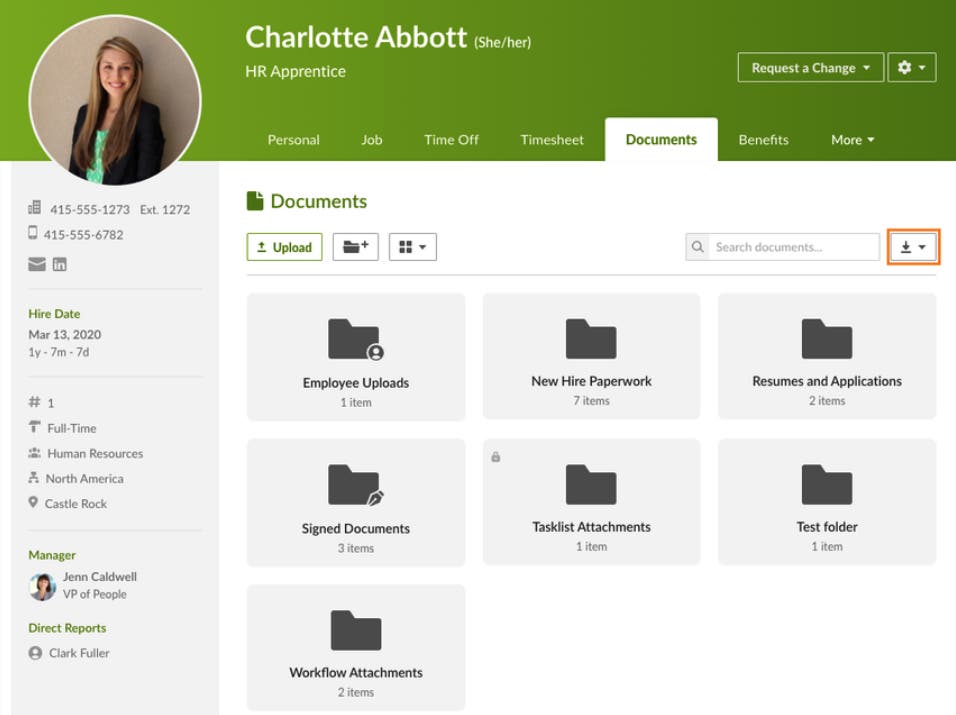
BambooHR is an all-in-one HR platform for small and mid-sized businesses, with document management built into the employee lifecycle. It helps teams securely manage employee data and records, including tax documents, from one system.
Key features:
- Centralized employee document storage: Store and manage contracts, onboarding files, and other employee records in individual profiles with multi-level subfolders.
- Built-in e-signatures: Start and track signature workflows without needing a separate tool.
- Drag-and-drop uploads and multi-select actions: Makes bulk document handling easier with a simple interface.
- Role-based access controls: Folder-level permissions help restrict access to sensitive records.
- Self-service document access: Employees can view and download their own documents from any device.
- Compliance tracking: Teams can set expiration dates and track missing records more easily.
3. DocuWare
DocuWare is a document management and workflow automation platform built for cross-department use, including HR. It helps HR teams digitize employee records, automate workflows, and stay compliant in one secure system.
Key features:
- Centralized digital employee files: Store and search contracts, payslips, certificates, and reviews in one archive.
- Visual workflow automation: Automate approvals and document processes with a visual workflow builder.
- AI-powered document capture: Identify document types, extract text, and index files automatically.
- Electronic signatures: Add legally binding e-signatures directly into workflows.
- 500+ integrations: Connects with SAP, Microsoft 365, SharePoint, Teams, QuickBooks, and many other platforms.
- Automated retention schedules: Enforces document lifecycle rules and removes expired records based on compliance needs.
4. ResNav History Link
ResNav History Link is a specialized archival solution built for preserving historical HR and payroll records during system transitions. It helps organizations stay compliant and audit-ready after moving to a new provider.
Key features:
- Automated document extraction: Pulls records from legacy HRIS, payroll systems, file servers, and shared drives.
- 200+ extraction protocols: Supports major payroll and HCM vendors such as ADP, Workday, UKG, Paycor, Paycom, and Gusto.
- Unaltered, audit-ready archive: Preserves data and calculation logic with links to employees, dates, and transactions.
- State-specific retention guidance: Helps align archiving practices with local record retention requirements.
- Single source of truth portal: Centralizes historical data in a secure, searchable Azure-based platform.
- Joint reporting: Supports cross-system reporting with current payroll and HRIS platforms.
5. UKG Document Manager
UKG Document Manager is part of the UKG HR Service Delivery platform, built for mid-to-large organizations that need centralized and compliance-focused document management tied to HR operations.
Key features:
- Centralized multi-source document hub: Brings together records from paper files, HRIS platforms, and digital sources in one secure system.
- Proactive compliance management: Supports retention rules by document type and helps identify missing or expiring records.
- Employee self-service: Employees can upload, sign, acknowledge, and access documents from any device.
- Role-based permissions and audit trails: Restricts access to sensitive records and logs document history.
- AI-driven knowledge base: Delivers role- and location-based HR content to reduce routine HR questions.
- Workflow automation: Automates routing, task assignment, and signature requests across HR processes.
The difference between HRIS and employee document management system
HRIS and a document management system are often used together, but they solve different problems. HRIS is built to manage structured HR data and daily processes such as payroll, attendance, leave, and performance.
A document management system focuses on the files connected to those processes, such as employment contracts, certificates, policy documents, and onboarding records.
For companies that already use an HRIS, adding a DMS is important because document-heavy workflows usually need more control than basic file storage can provide.
Here are the main differences:
What each system is built for
- HRIS: Manages core HR processes such as payroll, attendance, leave, and performance.
- Employee DMS: Manages employee files such as contracts, certificates, IDs, policy acknowledgments, and onboarding documents.
What kind of data each system handles
- HRIS: Works with structured data stored in records, fields, and dashboards.
- Employee DMS: Works with unstructured data stored as files and documents.
What a DMS adds beyond basic HRIS storage
- Version control, so teams always access the latest approved file
- Audit trails to track who uploaded, edited, approved, or accessed a document
- Expiry and renewal reminders for time-sensitive records
- Granular access control for sensitive employee documents
- E-signature and approval workflows for document-heavy processes
Ideally, company still need both of these platform because most HRIS platform provide the basic document storage with limited capabilities. This bottleneck extends to compliance monitoring, accessibility to track across teams, weak audit readiness and compliance monitoring, and other potential issues.
Without dedicated document lifecycle management, retention policies and governance often fall short of what organizations need.
Key differences between HRIS and employee DMS
Rather than replacing their existing HRIS, many organizations deploy a document management system (DMS) alongside it. The HRIS continues to handle day-to-day HR operations while the DMS provides stronger document governance and compliance control.
Together, they eliminate document bottlenecks and strengthen compliance without disrupting established HR workflows. Here are the summary of key difference between HRIS and Employee Document Management System.
| Dimension | HRIS | Employee DMS |
|---|---|---|
| Primary function | Manage HR processes and data | Manage HR documents and files |
| Data type | Structured data | Unstructured files |
| Core output | Payroll, reports, workflows | Document repository, audit trail |
| Key users | HR ops, payroll, managers | HR admin, legal, compliance |
| Example actions | Run payroll, approve leave | Store contracts, track expiry |
Key benefits of an employee document management system
An employee document management system helps companies manage HR records more efficiently, securely, and consistently. Beyond storage, it supports faster access, stronger compliance, and smoother HR processes across the employee lifecycle.
- Centralized, instant document access: All employee files are stored in one searchable repository, so HR teams no longer need to search through filing cabinets, email threads, or scattered folders across departments.
- Regulatory compliance and audit readiness: Automated retention schedules, role-based access, and digital audit trails help organizations maintain proper document governance and demonstrate compliance more easily during audits or reviews.
- Improved HR productivity: Automation of routine tasks such as filing, routing, and expiry alerts reduces administrative workload, allowing HR teams to focus more on strategic work.
- Enhanced data security: Granular permission settings ensure that only authorized personnel can access sensitive employee records, including medical, disciplinary, or compensation-related documents.
- Faster onboarding and offboarding: Document checklists, e-signatures, and automated routing help accelerate employee lifecycle processes from joining through exit.
- Cost reduction: A digital system reduces the need for physical storage, printing, and the hidden cost of time spent searching for lost or misfiled documents.
- Scalability: The system can support growing headcount and document volume without requiring the same increase in manual HR administrative work.
Types of documents managed in an employee document management system
An employee document management system can handle a wide range of records across the full employee lifecycle. To make the scope easier to understand, these documents can be grouped by HR function.
- Policy and SOP documentation: Company policies, SOPs, internal guidelines, and employee handbooks can be centralized so employees always access approved and up-to-date documents.
- Recruitment and onboarding: Job applications, offer letters, employment contracts, NDA agreements, background check records, and onboarding checklists needed during the hiring and joining process.
- Personal and identification records: Identity documents, emergency contact forms, tax forms, and bank account details stored securely as part of each employee’s core records.
- Performance management: Appraisal forms, performance improvement plans, promotion records, and goal-setting documents used to support performance tracking and documentation.
- Compensation and benefits: Payslips, salary revision letters, benefits enrollment forms, and reimbursement records organized for easier access and control.
- Leave and attendance: Leave applications, medical certificates, attendance records, and shift schedules that support employee administration and policy enforcement.
- Training and development: Certification records, training completion documents, and professional development plans maintained to track learning progress and qualifications.
- Offboarding: Resignation letters, exit interview forms, clearance checklists, and final settlement documents managed in a structured way to support a smoother exit process.
How Mekari Officeless can power your employee document management
Mekari Officeless is a platform built to accelerate business app creation, workflow automation, and analytics. Through its marketplace, companies can directly use a pre-built Document Management System module without having to build everything from scratch.
Designed for the operational needs of mid-to-large Indonesian enterprises, the Document Management System in Mekari Officeless supports multi-department document flows, customizable approval chains, and integration with the broader Mekari ecosystem.
This makes it especially relevant for companies that already use an HRIS or payroll system but still need stronger control over employee documents.
- Centralized document storage: All employee files are stored in one organized and searchable system, making it easier for authorized users to access the documents they need.
- Multi-level approval workflows: Document routing can be automated across HR, line managers, and leadership teams through configurable approval chains.
- Role-based access control: Sensitive employee data can only be accessed by the right people based on their role and department.
- Audit trail and compliance logs: Every document action is recorded automatically, helping companies support internal audits and regulatory compliance, including UU PDP.
- E-signature and digital acknowledgment: Employees can sign contracts, acknowledge policies, and submit requests digitally without relying on manual paperwork.
- No-code workflow builder: HR teams can configure and adjust document workflows on their own without depending on IT for every change.
- Integration with Mekari ecosystem: The platform connects with Mekari Talenta, Mekari Payroll, and other Mekari products to support more unified people operations.
Discover a smarter way to manage employee documents with Mekari Officeless DMS, from storage and approvals to compliance and audit readiness.