


- Most companies don’t have a supplier database, they have a supplier mess. 75% of procurement leaders doubt their own data’s accuracy. A structured database is the foundation for spend visibility, vendor risk, and procurement efficiency.
- You don’t need IT to build one. No-code platforms let procurement teams launch a fully customized supplier database, with onboarding forms, approval workflows, and compliance tracking, without writing a single line of code.
- A supplier database is only as powerful as the workflows connected to it. Mekari Officeless e-Procurement goes beyond a static database by connecting vendor records to sourcing, PO creation, contract management, and performance tracking in a single integrated platform — fully customizable for your company’s exact procurement policies and niche requirements.
Procurement teams cannot manage what they cannot see. With even best-in-class organizations reaching only 54% full spend visibility (SpendHQ), and many teams still relying on spreadsheets, supplier data can quickly become scattered, outdated, and hard to trust.
A centralized supplier database fixes that by keeping vendor details, categories, approvals, and compliance records in one place. Better yet, with today’s no-code and low-code platforms, you can build one without waiting on IT or writing a single line of code.
This guide walks you through what a supplier database is, what to include, how to build it step by step.
What is a supplier database?

A supplier database is a centralized digital repository that stores all important information about a company’s vendors and suppliers, such as:
- Contact details: Company name, PIC, email, phone number, and address
- Product or service categories: What each supplier provides
- Qualifications: Certifications, business licenses, or required vendor criteria
- Compliance documents: Tax documents, legal files, insurance, or audit records
- Contract status: Active contracts, renewal dates, terms, and pricing agreements
- Performance history: Delivery quality, response time, issue records, and evaluation scores
Unlike a simple spreadsheet, a supplier database is structured, searchable, and connected to procurement workflows like vendor onboarding, approval, PO issuance, and performance review.
Although “supplier” and “vendor” are often used interchangeably, the database can manage both long-term strategic suppliers and one-time transactional vendors. This makes it a strong foundation for spend visibility, risk management, compliance, and faster sourcing decisions.
Why most supplier databases fail and what to do instead
Most supplier databases fail because they are not really databases. They are scattered spreadsheets, email threads, desktop folders, and disconnected ERP records that procurement teams have to piece together manually.
Common problems include:
- Data silos: Supplier information is spread across different people, tools, and folders, with no single source of truth.
- Manual entry errors: 75% of procurement leaders are not fully confident in the accuracy of their own supplier data (Tradogram).
- Outdated records: Contact details, certifications, and contract statuses become stale without a clear update process.
- No qualification tracking: Teams may still work with unverified or high-risk vendors because compliance data is hard to find. In fact, 54% of organizations report they are not confident in their ability to assess risk across the vendor lifecycle. (Mitratech)
- Poor searchability: Finding the right supplier by category, location, status, or qualification means manually checking rows one by one.
What works better is a structured digital supplier database with clear fields, approval status, document tracking, and workflow integration. Instead of only storing supplier names, it gives procurement teams a reliable system to verify vendors, monitor risk, and make faster sourcing decisions.
What fields should a supplier database include?
A supplier database should include more than just company names and contact details.
To make it useful for procurement, compliance, finance, and operations teams, the database needs structured fields that help verify suppliers, track documents, monitor contracts, and evaluate performance.
| Field category | Key fields | Why it matters |
|---|---|---|
| Basic identification | Supplier name, legal entity, tax/NPWP number, registration number | Verifies the supplier’s legal identity and supports invoicing and compliance. |
| Contact information | Primary contact name, email, phone, address, country/city | Makes communication, sourcing outreach, and follow-ups easier. |
| Category and scope | Supply category, industry, product/service tags, UNSPSC codes | Helps teams filter suppliers by category and make faster sourcing decisions. |
| Qualification and compliance | Vendor status, certification upload, tax clearance, NPWP status | Prevents teams from working with unverified or high-risk suppliers. |
| Commercial terms | Payment terms, currency, lead time, minimum order quantity | Supports purchase order creation, payment planning, and AP processing. |
| Contract status | Contract start/end date, auto-renewal flag, contract document link | Helps prevent missed renewals and contract lapses. |
| Performance | On-time delivery rate, quality score, issue log, last audit date | Makes supplier evaluation and segmentation easier. |
| Financial and risk | Bank account details, financial health rating, sanctions check date | Reduces payment risk and supports due diligence. |
| Custom fields | Internal notes, approval tier, preferred status, industry-specific tags | Allows the database to match your company’s procurement policies. |
The exact fields will depend on your business model and industry. A manufacturing company may need material certifications, a construction firm may need HSE compliance fields, while a service-based company may need SLA tracking.
This is why a no-code or low-code approach works well: teams can customize fields, forms, and workflows without rebuilding the entire system.
How to build a supplier database using a low code no code platform
Building a supplier database no longer requires a development team or an expensive ERP customization project. No-code and low-code platforms let procurement teams design, deploy, and maintain the database themselves: with changes that take hours, not sprint cycles.
Why low code no code?
- Procurement teams, not IT departments can own and maintain the database
- Changes to fields, forms, and workflows can be made in hours, not weeks
- No developer budget is required for the base structure
- The system can be customized for different supplier categories, business units, or compliance regimes
Step 1: Define your supplier entities and relationships
Before opening any tool, map out what “objects” your database will contain. A typical supplier database has at least these linked entities:
- Supplier/company: the legal vendor entity (core table)
- Contact persons: individuals at each vendor, multiple per company
- Documents: contracts, certifications, NDAs, tax documents, linked to the supplier
- Categories/products: what each supplier provides
- Performance records: evaluations, audit results, issue logs
The key principle: separate these into distinct tables rather than one massive flat spreadsheet. Relational structure enables filtered queries like “show me all verified suppliers in the MRO category with active contracts”, something a flat file simply cannot do.
Step 2: Define required fields for each entity
Using the field guide in the previous section, decide which fields are mandatory versus optional for your context. Map out which fields come from the supplier (via onboarding form) versus which are filled internally: status, tier, performance score, and risk ratings are typically owned by the procurement team, not submitted by the vendor.
This mapping exercise prevents two common mistakes: collecting too little data at onboarding and collecting so much that suppliers abandon the form.
Step 3: Build the supplier onboarding form
Use your no-code platform to create a digital form that suppliers complete when registering. A well-designed onboarding form should:
- Collect all required identification, contact, category, and compliance fields
- Include file upload fields for certifications and documents
- Apply validation rules (e.g., require a correct NPWP format, enforce mandatory fields)
- Trigger an automated notification to the procurement team upon submission
Replacing email-based onboarding with a structured form is often the single highest-impact change a team can make: it eliminates the manual copy-paste step that introduces most data entry errors.
Step 4: Set up an approval workflow for supplier verification
Not every vendor who submits a form should be auto-approved. Build an approval workflow that:
- Routes new submissions to a procurement reviewer or manager
- Allows the reviewer to change vendor status (unverified → pending → verified) with notes
- Sends automated email notifications to the vendor at each status change
- Supports multi-level approval for high-risk categories (e.g., requires finance and legal sign-off)
This workflow is what turns a supplier database into a governance tool, not just a directory.
Step 5: Build the internal supplier database view
Build a searchable, filterable internal view of the supplier database for your procurement team. This view should:
- Allow filtering by category, status, location, certification type, and contract expiry
- Show key fields at a glance: name, category, status, last audit
- Link to detailed supplier profiles including documents and performance history
- Support bulk export for reporting or ERP integration
Different team members may need different views. A category buyer needs to filter by commodity; a compliance officer needs to filter by certification status. Role-based views reduce noise without restricting access to the underlying data.
Step 6: Connect to procurement workflows
A supplier database reaches its full potential when connected to downstream procurement actions. Key integration points include:
- Sourcing: filter verified suppliers by category when issuing RFQs
- PO creation: auto-populate vendor details from the database into purchase orders
- Contract management: trigger renewal alerts based on contract end dates
- Supplier performance: log delivery and quality scores against vendor records after each transaction
Even without deep ERP integration, a well-structured database can serve as the reference layer that procurement staff consult before initiating any supplier interaction.
Step 7: Customize for your industry or business niche
This is where the no-code advantage becomes most visible. Standard procurement workflows can be adapted with fields and automations specific to your operating context:
| Industry/niche | Custom fields to add | Custom workflows |
|---|---|---|
| Manufacturing | Material certification (ISO 9001, halal), lead time per SKU, minimum batch size | Incoming material quality check trigger after delivery |
| Construction/EPC | HSE compliance certificate, work permit history, equipment ownership | HSE audit scheduling workflow tied to project start |
| Healthcare/pharma | BPOM registration, cold chain capability, GMP certification | Compliance re-verification workflow every 12 months |
| Retail/FMCG | Product category codes, delivery zone, promotional calendar link | Seasonal sourcing shortlist workflow |
| IT/technology | SOC 2/ISO 27001 certification, SLA tier, data processing agreement | Annual vendor security review workflow |
| General enterprise | Preferred vendor tier, strategic vs. transactional flag, diversity status | Annual performance review and tier re-evaluation workflow |
Manual spreadsheet vs. no-code supplier database: a comparison
The table below addresses a question most procurement teams eventually ask: “We already have a spreadsheet, why change?” The answer isn’t just about features; it’s about what breaks down at scale and what fails silently before anyone notices.
| Aspect | Manual spreadsheet | No-code database platform |
|---|---|---|
| Data structure | Flat rows; no relational linking between vendors, contacts, and documents | Relational tables; one vendor links to multiple contacts, documents, and POs |
| Searchability | Limited; requires manual filtering or VLOOKUP | Instant filter by category, status, location, compliance field, contract date |
| Vendor onboarding | Email forms or physical questionnaires; manual copy-paste into spreadsheet | Digital form with automatic data capture directly into the database |
| Approval workflow | Email chains; no structured approval logic | Automated routing to reviewer; status updates with notifications |
| Document management | Files stored in separate folders; no linking to vendor records | Documents uploaded and linked to the vendor profile; version-controlled |
| Access control | Difficult to restrict; entire sheet visible to all users | Role-based access; suppliers see only their own profile; teams see filtered views |
| Data accuracy | Prone to typos, duplicate rows, and stale data; 74% of teams face this issue | Validation rules, required fields, and duplicate detection reduce errors |
| Performance tracking | Manual score columns; no historical log | Performance records linked to vendor; trackable over time |
| Scalability | Slows down significantly with 50+ vendors | Handles hundreds or thousands of vendors without performance degradation |
| Integration | Manual CSV exports; no live sync | API/webhook integration with ERP, PO systems, and contract tools |
| Compliance audit | No automatic alerts for expiring certs or contracts | Automated alerts for certification renewal, contract expiry, and re-verification triggers |
The spreadsheet’s appeal is familiarity and low startup cost. Its failure mode is gradual invisibility, data that looks fine until the moment it matters, whether that’s an expired certification, a lapsed contract, or a vendor whose risk status was never updated after an audit.
How Mekari Officeless can build your supplier database, ready to use
A supplier database is only as useful as the system behind it. Getting the structure right, the right fields, the right approval logic, the right workflow connections, is what separates a database that procurement teams actually trust from one that quietly becomes another spreadsheet.
The steps in this guide give you that foundation. What you need next is a platform that lets you build and maintain it without depending on IT every time something needs to change.
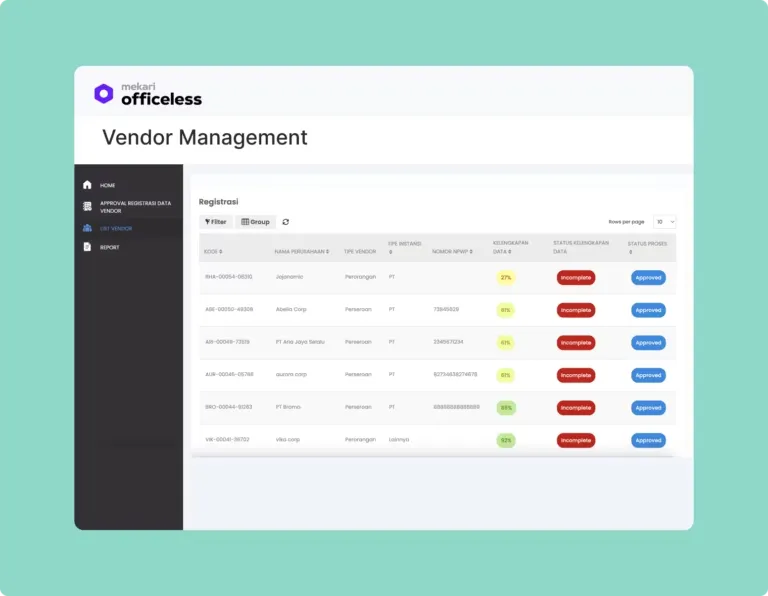
Mekari Officeless is a no-code/low-code platform with a pre-built e-procurement solution that gives procurement teams a head start, no IT dependency required, and fully customizable for any industry or compliance requirement.
Key capabilities:
- Vendor management module — manage vendor databases, qualifications, and performance in one place, with status-based approval (unverified, pending, verified)
- Drag-and-drop form builder — build custom onboarding forms with industry-specific fields, no coding needed
- Customizable approval workflows — design multi-level approval flows that match your company hierarchy
- Pre-built e-procurement solution — covers the full procurement lifecycle: P2P, e-sourcing, vendor management, contract management, and real-time reporting
- Ecosystem integration — connects to Mekari Jurnal, Mekari Sign, Mekari Pay, and Mekari Klikpajak out of the box
- Enterprise-grade security — ISO 27001 certified with role-based access control
Start building your supplier database today with the Mekari Officeless eProcurement Solution or explore the no-code/low-code platform to see what you can configure.
References and methodology
Methodology
Methodology
Articles published by Mekari Officeless are developed using trusted sources, including official data, company reports, academic research, and insights from industry practitioners. Whenever possible, we refer directly to primary sources before drawing conclusions. Our editorial team reviews and verifies the information to ensure accuracy and relevance. All references are listed so readers can trace each piece of information back to its original source.
Our editorial standards
Our editorial standards
- Primary source first: We consult official product documentation and pricing pages directly, not secondhand summaries or aggregator sites.
- Fact-checking: All product features, pricing, and claims are cross-verified against each platform’s official website at the time of writing.
- No paid placement: Tools are selected based on relevance and fit for Indonesian businesses, not commercial arrangements. Mekari Officeless is included as a first-party product and is transparently labeled as such.
- Regular review: Articles are periodically updated to reflect product changes or shifts in market relevance.
References
References
Tradogram. ‘’7 Benefits of Data-Driven Sourcing & Procurement’’