


- 62% of every workday is lost to manual and repetitive tasks, leaving teams only 27% of their time for actual job responsibilities (Asana).
- Workflow automation saves an average of 498 hours per employee per year.
- Mekari Officeless DMS is built for Indonesian enterprises, combining document control, workflow automation, and native Mekari integration in one configurable platform.
Your team isn’t inefficient—your systems are. Up to 62% of the workday is spent on repetitive tasks like updating statuses, chasing approvals, and re-entering data. Automatic task management software removes these bottlenecks by automating workflows, routing tasks, and tracking progress.
This guide compares 7 leading tools, highlighting their strengths, ideal use cases, and limitations. We ranked them based on automation capabilities, ease of no-code setup, enterprise features, integration options, and suitability for Indonesian businesses where relevant.
What to look for in automatic task management software
Before choosing a tool, align on what your team actually needs automated. The right platform depends on the answer to these questions:
- Automation depth: Can it trigger multi-step workflows based on rules and conditions, without manual input at each stage?
- No-code configuration: Can business teams set up and adjust workflows without developer support?
- Audit trail and compliance: Is every action logged with user identity and timestamp, ready for review or audit?
- Integration: Does it connect with the tools your team already uses: ERP, HRIS, finance, and communication platforms?
- Enterprise readiness: Does it support role-based access control, SSO, and data governance at scale?
1. Monday.com
Best for: Cross-team workflow coordination
Monday.com is a work management platform that combines task boards, automated workflows, and real-time reporting in one interface. Its automation builder lets teams create rules that trigger actions such as assigning a task, changing a status, or sending a notification, without writing code.
The platform supports Kanban boards, Gantt-style timelines, and custom dashboards. Teams across marketing, operations, HR, and product use it to manage recurring workflows and cross-functional projects from one workspace.
Key automation features:
- Rule-based automation for status changes, assignments, and notifications
- No-code workflow builder with pre-built templates
- Integration with Slack, Google Drive, Salesforce, Jira, and 200+ other tools
- Real-time dashboards and workload visibility across teams
Best fit: Mid-sized to large teams coordinating work across multiple departments who need a visual, flexible platform that is fast to deploy.
Limitation: Can become expensive for larger teams. Advanced reporting and automation features are locked behind higher-tier plans. Not purpose-built for compliance-heavy document workflows.
Pricing: Plans start from around $9 per user per month; enterprise pricing is available.
2. Mekari Officeless DMS
Best for: Document-linked task automation in Indonesian enterprises
Recommended for enterprise teams in Indonesia
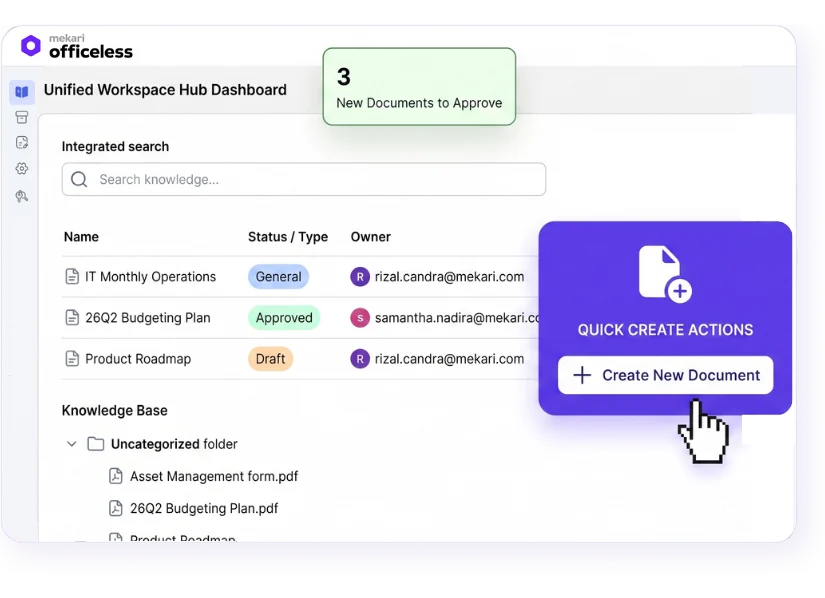
Mekari Officeless DMS is a ready-made app from the Officeless marketplace that combines document management and workflow automation in one enterprise-grade system. Unlike general task management tools, it links task routing directly to documents — so approvals, reviews, and status changes are tied to structured document workflows with a complete audit trail at every stage.
It is built for mid-to-large Indonesian enterprises that need controlled, multi-step document processes without spending months on custom development. The system is pre-built and configurable to existing SOPs and approval structures from day one.
Key automation features:
- Multi-level approval workflows with sequential or parallel routing, escalation rules, and delegation
- No-code workflow builder: business teams configure and adjust workflows independently, without IT involvement
- Automated version control: every document change is tracked; outdated versions are automatically archived
- Role-based access control: access is determined by role, department, or position
- Complete audit trail: every action logged with user identity and timestamp, ready for compliance review
- Centralized knowledge base: employees always access the latest approved version of policies and SOPs
Mekari ecosystem integration: Mekari Officeless DMS connects natively with Mekari Jurnal (finance and accounting), Mekari Expense (spend control), Mekari Talenta (HRIS), and Mekari Pay (vendor payments). This means document-linked tasks can flow across procurement, HR, and finance without switching platforms.
For organizations using SAP or other ERPs, the platform supports API-based integration without requiring ABAP development.
Best fit: Indonesian enterprises managing compliance-heavy document workflows, multi-department approvals, or procurement processes that need structure, auditability, and ecosystem integration, without a long implementation cycle.
Limitation: Optimized for workflow and document automation rather than out-of-the-box project management. However, workflows can be customized to match company-specific processes. Teams with advanced agile project management needs may still benefit from dedicated PM platforms.
Pricing: Contact Mekari Officeless for enterprise pricing
3. ClickUp
Best for: Highly customizable workspaces
ClickUp bundles tasks, documents, goals, dashboards, and chat into one platform. Its automation builder supports conditional workflows that apply across projects and teams, and it offers more view types than most competitors: list, board, Gantt, calendar, and mind map, among others.
Teams can build custom task statuses, create their own workflows from scratch, and link tasks to goals or OKRs for top-down visibility. The platform is particularly popular with teams that want to replace multiple tools with one configurable workspace.
Key automation features:
- Conditional workflow automation across projects and spaces
- Custom task statuses and workflow stages
- Integration with GitHub, GitLab, Slack, Google Drive, Jira, and 1,000+ apps
- Workload management and time tracking built in
Best fit: Small to mid-sized teams that want a flexible, all-in-one workspace and are willing to invest time in configuration to get exactly the setup they need.
Limitation: High flexibility comes with a learning curve. Setting up complex workflows and views can be time-consuming. Sprint Points (for agile teams) are capped on lower-tier plans, requiring an upgrade for active engineering teams.
Pricing: Plans start from around $7 per user per month; enterprise tiers available.
4. Asana
Best for: Team project coordination and timeline visibility
Asana is a project and task management platform built around structured team coordination. It allows teams to create projects, assign tasks, set dependencies, and track work through timelines and boards. Its Rules feature automates common actions (assigning tasks, updating fields, sending notifications) based on triggers.
Asana’s timeline view makes it easy to spot scheduling conflicts and bottlenecks before they become problems. The platform integrates with Salesforce, Slack, Microsoft Teams, Google Workspace, and dozens of other tools.
Key automation features:
- Rules for automated task assignment, field updates, and status notifications
- Pre-built workflow templates across common use cases
- Portfolio and goal tracking to link task completion to business objectives
- AI-powered reports and workload visibility
Best fit: Teams that need clear project coordination, timeline management, and structured task handoffs across departments.
Limitation: Time tracking is only available on higher-tier plans. Advanced customization and automation features require Business or Enterprise plans. Less suited to document-heavy workflows that need version control or compliance audit trails.
Pricing: Plans start from around $10.99 per user per month; enterprise pricing available.
5. Wrike
Best for: Multi-project portfolios with detailed resource planning
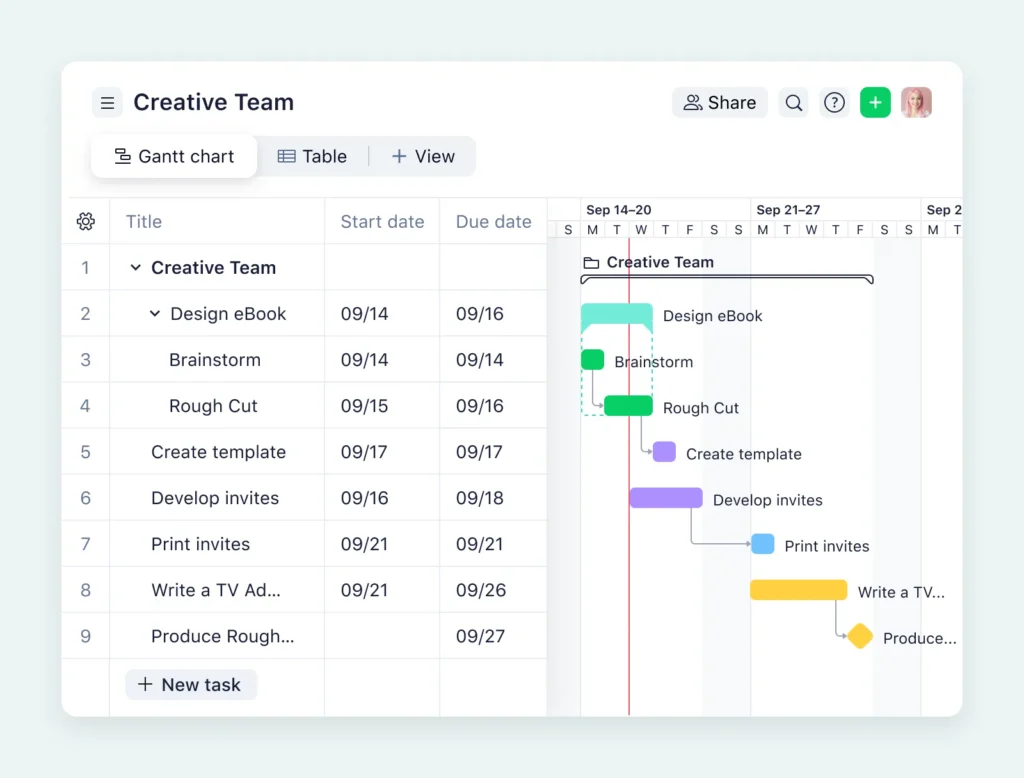
Wrike is built for teams managing complex, multi-layered projects across departments. Its automation rules handle routing, approvals, and status updates, while the resource management features help managers allocate workload and identify over-capacity before it causes delays.
Wrike’s reporting tools provide granular visibility into project health, task completion rates, and team utilization. It is widely used in marketing, professional services, and operations teams that run multiple simultaneous projects.
Key automation features:
- Automation rules for task routing, approval workflows, and status changes
- Resource management and workload balancing dashboards
- Custom workflows and request forms with automated routing
- Integration with Salesforce, Slack, Microsoft Teams, Google Drive, and more
Best fit: Operations, marketing, and professional services teams managing high project volumes with multiple stakeholders and resource constraints.
Limitation: Steep learning curve due to feature depth. Higher-tier pricing can be prohibitive for smaller teams. The interface requires more onboarding time than simpler tools.
Pricing: Plans start from around $10 per user per month; enterprise plans available.
6. Smartsheet
Best for: Teams transitioning from spreadsheet-based workflows
Smartsheet uses a grid-and-Gantt interface that feels familiar to teams accustomed to Excel. It adds workflow automation, approval routing, and real-time reporting on top of that familiar structure, making it a lower-friction entry point for teams moving away from spreadsheets.
The platform supports automated alerts, approval requests, and update reminders. Its reporting layer aggregates data across multiple sheets into executive dashboards.
Key automation features:
- Automated alerts, approval requests, and update reminders
- Workflow automation rules without coding
- Gantt charts and resource management for project planning
- Integration with Microsoft 365, Google Workspace, Slack, Salesforce, and others
Best fit: Teams that are currently managing work in Excel or Google Sheets and need to add automation and visibility without a steep learning curve.
Limitation: Enterprise buyers should carefully negotiate long-term pricing contracts following the platform’s late-2024 private equity acquisition. Advanced security features are restricted to higher-tier plans.
Pricing: Plans start from around $9 per user per month; enterprise pricing available.
7. Jira
Best for: Agile and software engineering teams
Jira is the standard for software development teams running Scrum, Kanban, or scaled agile frameworks. It connects task tracking directly to code repositories, sprint planning, and deployment workflows. Automation rules handle assignment, priority updates, and notifications based on workflow triggers.
Jira Align extends these capabilities to enterprise-scale agile planning, connecting team-level work to strategic objectives across the organization.
Key automation features:
- Automation rules for ticket assignment, priority setting, and status updates
- Sprint planning, backlog grooming, and velocity reporting
- Native integration with GitHub, GitLab, Bitbucket, Confluence, and Atlassian tools
- Jira Align for enterprise portfolio and strategic planning
Best fit: Engineering teams of any size running structured agile workflows, especially those already in the Atlassian ecosystem.
Limitation: Not designed for general business task management or document workflow automation. Teams outside engineering (marketing, HR, finance) often find the interface unintuitive. Free plan limits automation to 100 runs per month.
Pricing: Free plan available for up to 10 users; paid plans start from around $7.75 per user per month; enterprise pricing available.
Which tool is right for your team?
| Tool | Best for | Automation style | Indonesia fit |
| Monday.com | Cross-team workflow coordination | No-code rules and triggers | General use |
| Mekari Officeless DMS | Document-linked enterprise workflows | No-code, document-native | Purpose-built for Indonesia |
| ClickUp | Customizable all-in-one workspaces | Conditional, cross-project | General use |
| Asana | Project coordination and timelines | Rule-based triggers | General use |
| Wrike | Multi-project portfolio management | Approval and resource routing | General use |
| Smartsheet | Spreadsheet-to-automation transitions | Alerts and approval requests | General use |
| Jira | Agile and engineering teams | Sprint and issue automation | General use |
For Indonesian enterprises managing compliance-heavy workflows, procurement approvals, and multi-department document processes, Mekari Officeless DMS offers the deepest fit.
It is the only tool on this list that is pre-built for Indonesian enterprise operations, integrates natively with the Mekari ecosystem, and links document control directly to task automation — all configurable without custom development.