


- AI improves document management by automating capture, classification, search, and access checks across the document lifecycle.
- Integrating AI into document search requires role-based access control and strict audit trails to prevent data leaks and ensure that only authorized users can access documents.
- Mekari Officeless Document Management System (DMS) streamlines compliance and centralizes control through automated workflows and secure role-based access.
AI improves document management by taking over the repetitive steps of the document lifecycle: reading, labeling, searching, and logging.
Yet AI legal research tools built on curated databases still hallucinated between 17% and 33% of the time in a Stanford and Yale evaluation (Magesh et al.). Company document repositories are rarely as well-organized as legal databases.
For operations or document control leaders at companies that already use an ERP, the deciding factor is not the AI model itself. What matters is whether documents are properly controlled before the model processes them.
This article explores how AI changes each stage of the document lifecycle, how reliable its outputs are when working with real documents, and where human oversight remains essential.
How Does AI Improve Document Management?
AI improves document management by automating repetitive tasks across the document lifecycle. These include reading and capturing information, classifying documents, applying access rules, finding relevant files, and recording document activity.
In a survey of 600 enterprises, 78% already operate with AI technology (AIIM and Deep Analysis). The open question is where it holds up.
The document lifecycle can be divided into five stages: Capture, Classify, Control, Retrieve, and Audit. Six AI capabilities support these stages.
1. Data Extraction & Processing
AI reads scanned documents, PDFs, and emails, then extracts information such as document numbers, revisions, and owners. However, you must determine which fields are required and review any information that the system cannot identify with confidence.
2. Automated Classification & Tagging
AI analyzes document content and suggests the appropriate document type and tags. People remain responsible for defining the classification system and assigning the correct retention category.
3. Enhanced Security and Redaction
AI identifies sensitive information, masks personal data, and checks whether access is appropriate for a user’s role. Your organization determines who can access specific documents and which information must be redacted.
4. Intelligent Search and Retrieval
AI helps users find documents based on their meaning rather than relying solely on keywords. It can also generate answers based on document content. You must still verify which revision is valid and determine who is allowed to receive the information.
5. Smart Summarization and Lifecycle Tracking
AI summarizes lengthy documents and tracks their progress throughout the lifecycle, from draft to archive. You decide whether a summary can replace the original document and when a document should expire.
6. Active Business Intelligence
AI converts document-related data, such as expiration dates, pending approvals, and recurring findings, into reports. People determine which signals require action and who is responsible for following up.
Many organizations expect AI to solve problems caused by poorly organized document repositories. However, looking at the entire document lifecycle reveals a different reality.
AI accelerates the processes it operates on. This means that unclear document ownership or inconsistent version rules can lead to unclear answers, only delivered faster.
How Reliable Is AI on Real Enterprise Documents?
Capture is the first stage of the document lifecycle, and it depends on AI’s ability to read documents accurately. This makes reliability an important starting point when evaluating the framework.
OmniDocBench, a benchmark of 981 pages across nine page types, measures text recognition error for each type. Its findings show that the performance of two leading models varies depending on the type of document being processed.
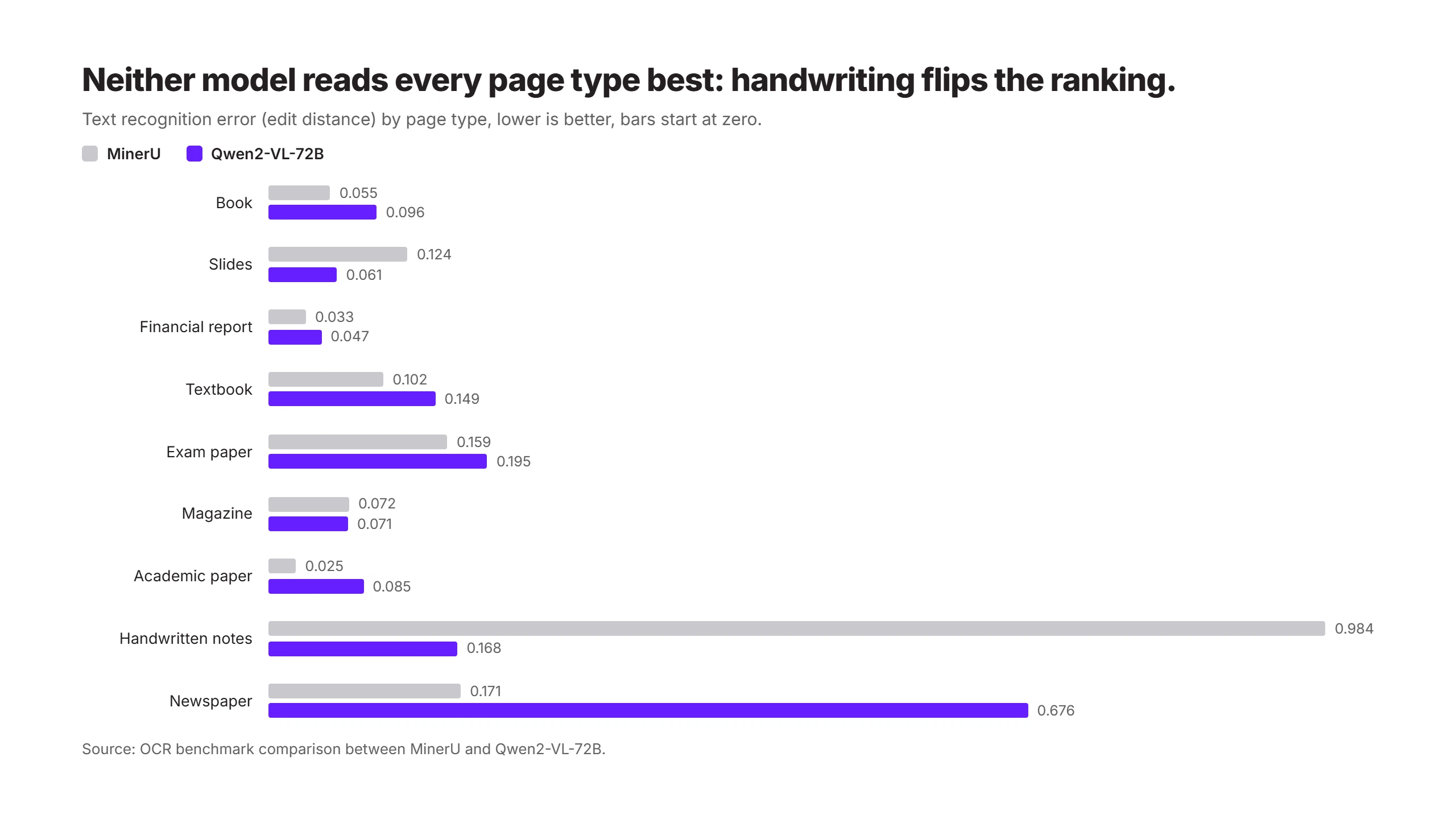
MinerU reads typed reports and academic papers with the lowest error. On handwritten notes its error reaches 0.984, against 0.168 for Qwen2-VL-72B. The ranking reverses again in newspapers.
Many teams assume the model with the best overall score is the safe choice. The chart shows otherwise.
A model strong on typed reports can fail on handwriting, so the document mix decides the choice, not the average. This holds for these two models; another product may differ.
OmniDocBench uses public documents, not company files. It shows the pattern, not the error rate to expect on your own contracts, permits, or inspection notes.
The Stanford and Yale evaluation from the introduction points the same way: curated inputs reduce errors but do not remove them. That study covers legal research, not document management in general, so treat it as the closest peer-reviewed measurement of grounded AI answers.
Before implementation, organizations should:
- Test each document type separately. Evaluate a sample from every document category rather than testing everything in one mixed batch.
- Send uncertain results for human review. Assign a designated reviewer to check outputs with low confidence.
What Changes at Capture and Classification?
Capture and Classify are the stages where AI reduces the most manual work but also introduces potential errors. AI extracts fields such as document numbers, revisions, issue dates, and owners, then suggests document types and tags.
Paper documents remain common. The AIIM 2025 survey found that 61% of intelligent document processing (IDP) processes still involve paper, while 66% of new IDP projects plan to replace existing systems.
Because IDP vendors sponsored the survey, these figures indicate industry direction rather than definitive measurements.
They also highlight the variety of document formats organizations handle and the ongoing changes in technology. A well-structured document system remains valuable even as tools evolve.
AI extraction results should be treated as suggestions, not confirmed records. Before accepting a document, you must verify:
- Document type: Whether the suggested category matches the organization’s classification system.
- Revision status: Whether the document is current and any superseded version has been closed.
- Owner: Whether a specific person is responsible for the document.
What Must Stay Controlled When AI Retrieves and Audits Documents?
The final three stages require strict access and version controls to prevent AI from exposing restricted files, leaking information across groups, or retrieving outdated revisions.
OWASP identifies vector and embedding weaknesses as retrieval security risks and recommends permission-aware storage, data classification, and tamper-resistant logs (OWASP LLM08:2025).
Similarly, ISO 45001:2018 clause 7.5 requires documented information to be controlled across access, retrieval, versioning, retention, and distribution. These requirements must be supported by clear organizational controls.
The following table outlines the controls enterprises need and the evidence auditors may request.
| Stage | Required control | Evidence an auditor may request |
|---|---|---|
| Control | Role-based access that is also applied to AI search | Access lists and access change history |
| Retrieve | Only the latest revision is searchable, and AI answers reference the source and its revision | Retrieval logs linking each answer to a specific document version |
| Audit | Approvals and access activities are recorded in a readable format | A complete audit trail from draft to archive |
These controls are more critical than model costs. Even an accurate AI answer becomes a security risk if delivered to an unauthorized user.
IBM and Ponemon report that organizations extensively using AI and automation in security operations experience $1.93 million lower data breach costs than those that do not (IBM, Cost of a Data Breach). While this figure relates to security operations rather than document management tools, it reinforces the value of strong security controls.
These principles form the basis of five practical checks before implementing AI in document management.
What Should an Enterprise Check Before Adding AI to Documents?
The five-stage framework produces five essential checks that help determine whether AI will improve document management or simply accelerate existing problems.
- Capture – Ownership. Every document must have a designated owner and clearly defined revision rules.
- Classify – Taxonomy. Document types and metadata must be established before AI starts suggesting classifications.
- Control – Permissions. Access must follow role-based and site-based rules, and AI-powered search must inherit those permissions.
- Retrieve – Citation. AI-generated answers must reference the source document and its revision so that people can verify the information.
- Audit – Logs. Approval and access activities must be recorded in a format that auditors can understand.
How Does Mekari Officeless HSE Support Controlled Documents?
AI improves document management at each of the five stages, but the result depends on documents that have an owner, a revision rule, and restricted access. Controlled documents come first, and AI second.
Your ERP remains the core system for managing financial, asset, and HR data. However, operational processes such as hazard reporting, risk assessments, work permits, and inspections often require additional applications.
Mekari Officeless as an extended ERP, filling these operational gaps with applications and workflows that integrate with SAP, Oracle, other ERP systems, and Mekari Talenta, Mekari Qontak, and Mekari Jurnal.
Mekari Officeless Document Management System (DMS) helps centralize document management and streamline document-related processes through the following capabilities:
- Centralized Document Repository: Centralize business documents in one secure repository for easier access and management.
- Document Version Control: Track document revisions and ensure teams work with the latest approved versions.
- Automated Approval Workflows: Streamline document review, approval, and publication processes through automated workflows.
- Role-Based Access Control (RBAC): Restrict document access and permissions based on user roles and responsibilities.
- Automated Audit Trails: Record document activities, approval histories, and user actions to support compliance and audit readiness.
Schedule a demo of Mekari Officeless Document Management System (DMS) now.
References and methodology
Methodology
Methodology
Articles published by Mekari Officeless are developed using trusted sources, including official data, company reports, academic research, and insights from industry practitioners. Whenever possible, we refer directly to primary sources before drawing conclusions. Our editorial team reviews and verifies the information to ensure accuracy and relevance. All references are listed so readers can trace each piece of information back to its original source.
Our editorial standards
Our editorial standards
- Primary source first: We consult official product documentation and pricing pages directly, not secondhand summaries or aggregator sites.
- Fact-checking: All product features, pricing, and claims are cross-verified against each platform’s official website at the time of writing.
- No paid placement: Tools are selected based on relevance and fit for Indonesian businesses, not commercial arrangements. Mekari Officeless is included as a first-party product and is transparently labeled as such.
- Regular review: Articles are periodically updated to reflect product changes or shifts in market relevance.