


Each no-code AI integration platform serves a different business need. Some are better for fast automation, while others are stronger for enterprise workflows, technical customization, or custom AI app development. Here are the list:
- Mekari Officeless OpenAI Connector is the best choice for mid-to-large businesses in Indonesia that want to embed AI into approval flows, document processing, task management, and operational workflows without coding.
- Make is ideal for Operations and IT teams that need to build complex, multi-step workflows with branching logic, data transformation, and AI integrations across multiple systems.
- Zapier + AI features works well for teams that need quick and simple AI automation, especially for marketing, HR, sales, and customer support use cases.
- Microsoft Power Automate + AI Builder is best for companies already using Microsoft 365, Dynamics 365, SharePoint, Teams, or Excel, especially for document processing and approval automation.
- n8n is suitable for technical teams that want open-source flexibility, self-hosting options, and deeper customization while still using a visual workflow builder.
- Google AppSheet + Vertex AI is a strong option for teams that need to build data-driven business apps with AI-supported predictions, classifications, or process tracking.
- Bubble + AI plugins is best for teams that want to create custom AI-powered web apps, internal tools, portals, dashboards, or lightweight SaaS products without a full development team.
Most businesses want to adopt AI, but cost, complexity, and limited developer resources often slow them down. The demand is already clear: 88% of organizations now use AI in at least one business function, according to McKinsey. Still, many teams struggle to turn AI interest into real workflows.
No-code AI integration platforms help close that gap. They allow teams in Finance, HR, Operations, IT, and other departments to connect AI capabilities into daily processes without writing code.
In this guide, we compare 7 of the best no-code AI integration platforms for business in 2025, including their key features, strengths, and ideal use cases.
What is a no-code AI integration platform?
A no-code AI integration platform is software that helps non-technical users connect AI capabilities to existing business systems and workflows without needing programming skills. These platforms can bring tools such as language models, image recognition, predictive analytics, and automated decision-making into everyday business processes.
Unlike traditional integration tools that often require developers, APIs, or custom coding, no-code AI integration platforms are designed to be easier for business users to manage. Common characteristics include:
- Visual drag-and-drop workflow builders
- Pre-built AI connectors, such as OpenAI, Google AI, or other AI services
- Trigger-based automation logic, such as if/then rules and event-based workflows
- Native integrations with ERP, CRM, HR, finance, database, and productivity systems
- No-code or low-code configuration that can be used by non-developers
The main business value lies in accessibility. In the past, building AI-powered workflows usually required data scientists, engineers, and dedicated development resources.
No-code platforms make AI more practical for a wider range of users, including business analysts, operations managers, HR teams, finance teams, and other citizen developers who understand the process but may not have technical coding skills.
Why businesses are turning to no-code AI integration
AI is quickly becoming part of everyday business operations, but many companies still struggle to put it into practice. The challenge is not only deciding where AI can help, but also having the technical resources to connect AI tools with existing systems, data, and workflows. This is why no-code AI integration is becoming more important. It gives business teams a faster and more accessible way to use AI without waiting for complex development cycles.
AI adoption is surging but technical talent is scarce
As more companies adopt AI, the need for technical expertise also increases. Many businesses want to build AI-connected systems, but they do not always have enough engineers, data specialists, or developers to support every project. This creates a gap between AI adoption and actual implementation.
In 2025, 78% of organizations use AI in at least one business function, up from 55% in 2023, according to McKinsey data.
No-code delivers measurable ROI and speed
No-code platforms help businesses reduce the time, cost, and technical effort needed to launch AI-powered workflows. Instead of building every integration from scratch, teams can use visual builders, templates, and pre-built connectors to move faster.
CodeConductor’s 2026 no-code statistics report that no-code projects generate an average ROI of 2,560%, with 91.9% of projects recovering their investment within the first year and 94.6% implemented in under three months.
Business teams, not just IT, need AI access
AI is no longer only an IT or engineering initiative. Teams in Finance, HR, Operations, Sales, and other departments often understand their workflow problems best, so they need tools that allow them to build or manage AI-powered processes without relying fully on developers.
According to Integrate.io’s 2026 no-code usage trends, teams using no-code platforms deliver work 2.7 times faster than traditional development approaches, with projects that previously took 6–8 months now completed in 3–4 weeks.
AI integration drives measurable efficiency gains
The value of AI integration becomes stronger when it is connected directly to business workflows. By automating repetitive tasks, improving data processing, and supporting faster decision-making, AI can help companies improve efficiency across departments.
Companies adopting AI at scale report 20–30% reductions in operational costs and more than 40% improvement in efficiency, based on McKinsey data cited by ARDEM.
7 best no-code AI integration platforms for business
Choosing the right no-code AI integration platform depends on your business size, existing systems, team capability, and how deeply you want AI to support daily workflows.
Some tools are better for quick automation, while others are built for enterprise workflows, complex integrations, or custom AI-powered apps.
1. Make: Best for visual workflow complexity
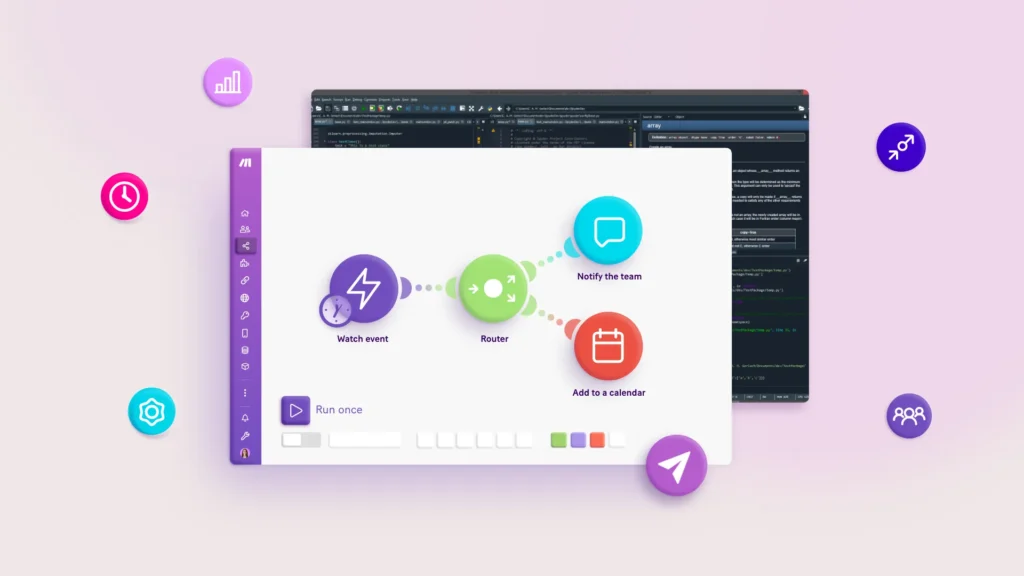
Make is a visual automation platform for building complex, multi-step workflows across apps and systems.
Its drag-and-drop canvas supports advanced automation with branching logic, filters, routers, and AI connections such as OpenAI, Anthropic, and Google AI.
Key features:
- Visual scenario builder with branching logic and error handling
- 1,500+ app connectors, including OpenAI, Slack, Google Sheets, and Salesforce
- HTTP/API modules for connecting unsupported AI services
- Real-time execution monitoring
- Data transformation tools
- Scheduling and webhook triggers
Best for: Operations and IT teams that need complex, multi-system workflows with AI steps embedded throughout the process.
2. Mekari Officeless Prebuilt OpenAI: Best for enterprise workflow AI in Indonesia
Mekari Officeless is a solution to build custom applications tailored to your business needs by offering a no-code/low-code app development platform, pre-built software, and custom enterprise software service.
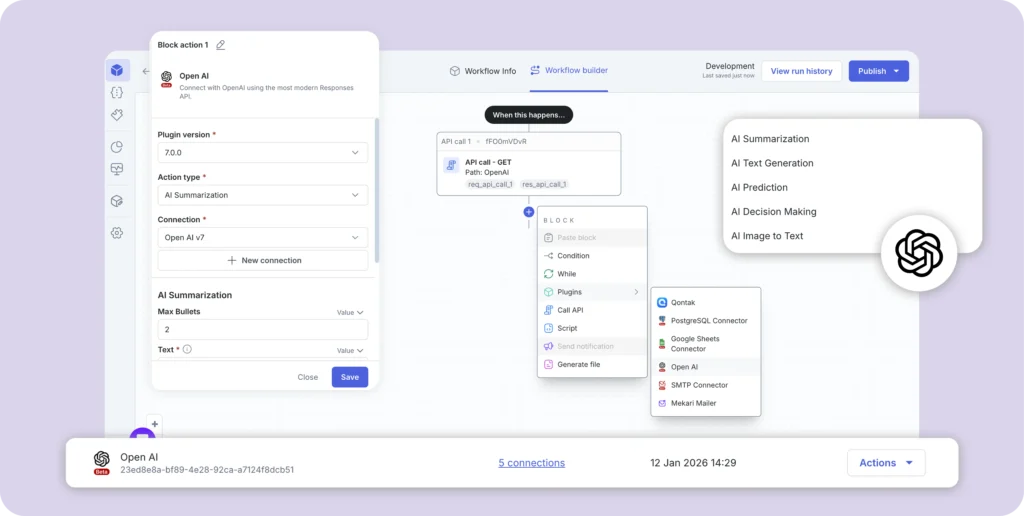
Through its OpenAI API Connector in the Officeless Marketplace, teams can embed AI into approval flows, document processes, operational workflows, and internal business apps without coding.
This makes Mekari Officeless especially relevant for businesses that want to use AI in real operational processes, not just as a standalone chatbot or productivity tool.
Teams can connect GPT-based capabilities into existing workflows, helping automate tasks such as document routing, content classification, approval assistance, internal request handling, and process monitoring.
Key features:
- AI Decision Making to analyze task variables and recommend logical next steps or approval decisions
- AI Prediction to estimate workloads and project completion timelines based on historical data trends
- AI Summarization to condense long comment threads, discussion stacks, or complex documents into actionable summaries
- AI Text Generation to create professional drafts for messages, email replies, or detailed task descriptions
- Smart Model Engine that automatically chooses the right model based on task complexity
- Cost-efficient AI usage by using lighter models for routine tasks and advanced models, such as GPT-4o, only when needed
- Zero-configuration setup where users only need to plug in their API key without manually switching between models
- Drag-and-drop workflow builder for creating multi-step workflows with conditional logic and role-based approvals
Best for: Mid-to-large enterprises in Indonesia that want to integrate OpenAI into operational workflows, approval management, or document processing.
3. Zapier + AI features: Best for quick AI automation setup
Zapier is a popular no-code automation platform for connecting everyday business apps. Its AI features allow teams to add GPT prompts, chatbots, and AI-powered steps into simple automated workflows without technical setup.
Key features:
- 6,000+ app integrations, including OpenAI, HubSpot, Gmail, Slack, and Google Sheets
- Built-in AI steps for running GPT prompts inside workflows
- Zapier Tables and Interfaces for light data management and forms
- Zapier Chatbots for building AI chat interfaces
- Simple if/then logic with multi-step Zaps
- Strong template library for common automation use cases
Best for: Marketing, HR, sales, and customer support teams that need fast AI automation without complex configuration.
4. Microsoft Power Automate + AI Builder: Best for Microsoft ecosystem
Microsoft Power Automate helps businesses automate workflows across Microsoft 365, Dynamics 365, SharePoint, Teams, and other systems. With AI Builder, teams can add no-code AI models for document processing, predictions, form reading, and approval automation.
Key features:
- AI Builder for invoice processing, document classification, prediction, and form reading
- Native integration with Microsoft 365, Dynamics 365, SharePoint, Teams, Outlook, and Excel
- RPA desktop flows for legacy systems
- Copilot-assisted flow builder
- Enterprise governance with Azure Active Directory and compliance controls
Best for: Finance, operations, and IT teams already using the Microsoft ecosystem.
5. n8n: Best for developer-friendly open-source AI automation
n8n is an open-source workflow automation platform that combines visual automation with technical flexibility. Teams can use it through a visual interface, self-host it for more control, or add code when workflows need deeper customization.
Key features:
- Open-source and self-hostable
- AI agent nodes for LangChain-based workflows
- OpenAI, Hugging Face, and Anthropic integrations
- 400+ pre-built app integrations
- Code nodes for JavaScript or Python customization
- Cloud and self-hosted deployment options
Best for: IT, operations, and engineering-adjacent teams that need open-source flexibility, self-hosting, and deeper customization.
6. Google AppSheet + Vertex AI: Best for data-driven business apps
Google AppSheet helps non-technical users build custom business apps from data sources such as Google Sheets, Excel, SQL, and cloud databases. With Vertex AI, teams can add machine learning capabilities such as predictions, classifications, and natural language processing.
Key features:
- No-code mobile and desktop app builder
- Vertex AI integration for machine learning capabilities
- Automation rules for scheduled and event-based actions
- Native Google Workspace integration
- Offline capability for field teams
- Role-based access and permissions
Best for: Operations, field teams, and data-driven business units that need custom apps with AI-supported predictions or process tracking.
7. Bubble + AI plugins: Best for building custom AI-powered applications
Bubble is a no-code platform for building custom web applications with a visual editor. Through AI plugins, teams can add GPT, image generation, and other AI capabilities into internal tools, customer portals, dashboards, or lightweight SaaS products.
Key features:
- Full-stack no-code app builder for front-end, database, and backend logic
- OpenAI, ChatGPT, and AI plugins through Bubble’s marketplace
- Custom workflows with conditional logic and API integrations
- Responsive design for desktop and mobile
- User authentication, role permissions, and data privacy controls
Best for: Product, operations, and IT teams that need custom AI-powered internal tools, portals, dashboards, or lightweight SaaS products.
Key features to look for in a no-code AI integration platform
Choosing the right platform for AI business integration means looking beyond AI connectivity.
The platform should support your workflows, data needs, approval process, and security requirements, especially when using AI for business automation across departments.
When evaluating a no-code AI integration platform, prioritize these capabilities:
- Pre-built AI connectors: Native integrations with OpenAI, Google AI, or other AI providers without building APIs from scratch.
- Visual workflow builder: Drag-and-drop tools that help non-technical users design, test, and deploy automations.
- Trigger-based automation: Event, schedule, or webhook triggers that run AI steps automatically when conditions are met.
- Data transformation tools: Features to map, filter, clean, and reformat data before or after AI processing.
- Multi-step approval logic: Routing, escalation, and human-in-the-loop review for business-critical workflows.
- ERP and HRM integration: Connectivity with core business systems to reduce manual data entry.
- Security and access controls: Role-based permissions, audit trails, encryption, and approval logs for compliance.
- Monitoring and analytics: Visibility into workflow performance, error rates, and AI output quality.
Mekari Officeless OpenAI plugin as the best business automation tool
Mekari Officeless helps businesses use AI beyond standalone tools by placing it directly inside daily operational workflows. Instead of switching between separate AI apps and business systems, teams can apply AI within processes such as approvals, document management, task updates, and internal requests.
Ready to use Mekari Officeless OpenAI Connector allows business users to add AI capabilities without depending on developers or building API connections from scratch.
Key capabilities include:
- Prebuilt OpenAI connector: Connects workflows to OpenAI models through a verified and maintained integration.
- AI decision making: Reviews task variables and suggests suitable next steps or approval decisions.
- AI prediction: Helps estimate workloads, timelines, and project completion based on historical trends.
- AI summarization: Converts long discussions, comment threads, or documents into clear and actionable summaries.
- AI text generation: Creates professional drafts for emails, messages, replies, and task descriptions.
- Smart model engine: Chooses the most suitable AI model based on the complexity of each task.
- Cost-efficient processing: Uses lighter models for routine actions and more advanced models only when deeper analysis is needed.
- Zero configuration: Removes the need to manually manage model selection or technical settings.
- Enterprise-grade security: Supports safer AI usage through data minimization, encrypted transmission, and privacy-focused processing.
By managing the technical work in the background, from API connection to AI processing, Mekari Officeless helps organizations focus on improving productivity, speeding up decisions, and expanding AI adoption across departments.
Explore the Mekari Officeless OpenAI Connector to start bringing AI into your workflows without writing code.
References and methodology
Methodology
Methodology
Articles published by Mekari Officeless are developed using trusted sources, including official data, company reports, academic research, and insights from industry practitioners. Whenever possible, we refer directly to primary sources before drawing conclusions. Our editorial team reviews and verifies the information to ensure accuracy and relevance. All references are listed so readers can trace each piece of information back to its original source.
Our editorial standards
Our editorial standards
- Primary source first: We consult official product documentation and pricing pages directly, not secondhand summaries or aggregator sites.
- Fact-checking: All product features, pricing, and claims are cross-verified against each platform’s official website at the time of writing.
- No paid placement: Tools are selected based on relevance and fit for Indonesian businesses, not commercial arrangements. Mekari Officeless is included as a first-party product and is transparently labeled as such.
- Regular review: Articles are periodically updated to reflect product changes or shifts in market relevance.
References
References
Markets and Markets. ‘’No-Code AI Platforms Market’’mi
McKinsey. ‘’The state of AI in 2025: Agents, innovation, and transformation’’